
hirevue interview
How to Pass a HireVue Interview: One-Way Video Prep & What the AI Scores
By Job Sparrow Team

You are staring at a blank screen. The timer is ticking down from 30. There is no human on the other side to smile, nod, or offer reassuring feedback. The psychological awkwardness of a one-way video interview is intense. Add to that the terrifying uncertainty of how a black-box AI algorithm evaluates your facial expressions, tone of voice, and answer content, and it is no wonder candidates feel overwhelmed.

If you are feeling anxious about an upcoming digital assessment, you are not alone. However, passing these interviews is a highly learnable skill. Once you understand exactly what the algorithm is looking for and how to structure your delivery, you can turn this awkward experience into a significant edge over less-prepared candidates.
At JobSparrow, our team has reviewed over 100,000 resumes and hired candidates across Australia, New Zealand, the United States, and Singapore. We know exactly what recruiters and AI systems are looking for. This guide will provide actionable one-way video interview tips, explain what the AI actually scores, and show you how to prepare with confidence.
Why one-way video interviews are now standard and how to approach them
The immediate anxiety job seekers feel when invited to an asynchronous interview is completely normal. Humans are wired to seek visual feedback during conversations, and talking to a webcam strips all of that away.
Despite the awkwardness for candidates, these systems are rapidly becoming the global standard for corporate hiring. Major graduate programs and corporate employers in Australia and New Zealand, including CommBank and Telstra, use HireVue to screen graduate and campus applicants. According to The Washington Post, more than 100 top employers, including Hilton and Unilever, have used the system to analyze over a million job seekers.
To succeed in a digital assessment anywhere in the world, you need to look at the process through a recruiter lens. We know exactly what these systems reward and how to position your answers to score highly.
What is a HireVue interview?
Before you can master the format, you need to understand the mechanics. An asynchronous or pre-recorded interview is a digital screening tool where you record video answers to standardized questions on your own time.
The standard format is highly structured. You will receive a text or video prompt on your screen. You typically get 30 seconds to prepare your thoughts, followed by up to 3 minutes to record your answer. Once the time is up, the recording stops automatically and submits to the employer.
Why do employers love this automated format? According to Indeed, asynchronous interviews use structured formats to mitigate unconscious bias and dramatically reduce hiring costs. Instead of spending weeks scheduling phone screens, a recruitment team can evaluate hundreds of candidates in a single afternoon. If you are managing multiple applications like this, keeping organized is critical. You can streamline your process by using tools discussed in The Ultimate Internship Application Tracker: Best Apps & Spreadsheets for Graduates in 2026.
The truth revealed: what does HireVue AI score?
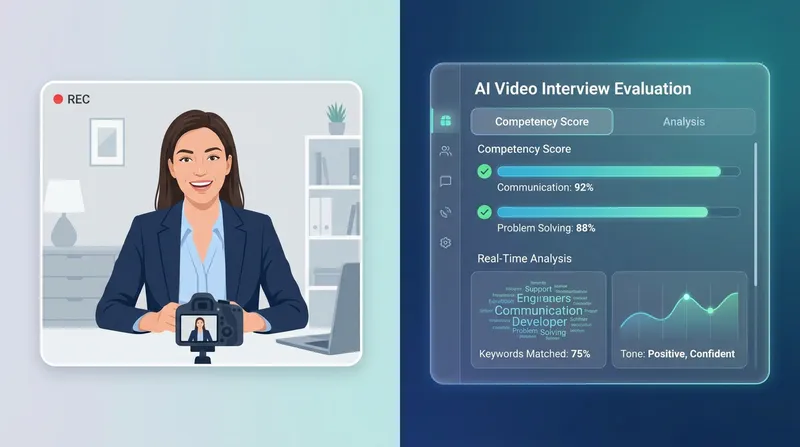
The biggest source of anxiety for candidates is the AI scoring system. Rumors constantly circulate on social media about algorithms analyzing your eye movements, micro-expressions, and the exact pitch of your voice.
It is time to debunk the biggest myth: HireVue no longer uses facial recognition or micro-expression analysis to score candidates. According to an in-depth report by SHRM, HireVue dropped facial analysis from its model entirely. The company found that visual analysis did not add enough predictive value and raised valid concerns about bias.
Note: While HireVue's exact algorithm is proprietary, the following scoring details are based on publicly available disclosures and independent research.
So, what does the AI actually score?
- Audio transcription: The AI converts your spoken words into text.
- Keyword density: It scans that text for industry-specific keywords and phrases relevant to the job description.
- Competency mapping: It evaluates your answers against a structured rubric to measure core competencies like problem-solving, teamwork, and adaptability.
Think of your AI video interview prep as similar to passing a resume parser. Clear, structured language is what the algorithm rewards. If you use vague language, the AI cannot map your skills to the rubric. Just like optimizing a resume, keyword relevance is vital, though you must avoid sounding robotic. You can learn more about how algorithms read applications in our guide on The ATS Score Trap: Why a 90% Match Will Cost You the Interview in 2026.
Finally, remember that human recruiters still review the highest-scoring videos. You must appeal to the bot with clear keywords, but you must appeal to the human with energy and professionalism.
Test Your Answers Before the Real Thing: Do not guess how an algorithm will score your voice. Run a simulated AI Mock Interview on JobSparrow to get an instant keyword and clarity analysis before your real test.
How to pass a HireVue interview: a step-by-step prep strategy
Knowing how to pass a one-way screening comes down to execution. Because you cannot rely on a recruiter's body language to guide your answers, preparation is the only way to overcome the awkwardness. Here are the essential pillars of asynchronous interview practice.
1. The essential setup checklist
Technical anxiety can ruin your performance before you even speak your first word. Follow this concrete setup checklist to ensure your physical environment is perfect:
- Lighting: Always face a natural light source like a window. If you are interviewing at night, place a ring light or a desk lamp directly behind your webcam. Never sit with a bright window behind you, or you will look like a shadow.
- Audio: Do not rely on your laptop's built-in microphone. Use a dedicated USB microphone, or at the very least, a high-quality headset or earbuds. Clear audio is critical because the AI relies on accurate speech-to-text transcription.
- Background: Keep it clean, neutral, and distraction-free. A blank wall or a tidy bookshelf works best. Blur your background if the platform allows it, but a physical clean space is always safer.
- Connection: Plug directly into your router with an Ethernet cable if possible. Close all background applications, especially cloud syncing services like Dropbox or Google Drive, to prevent lag.
2. Master camera presence for video interviews
Having great camera presence requires breaking bad habits. The most common mistake candidates make is looking at themselves on the screen instead of looking into the camera lens. When you look at the screen, you appear to be looking down, breaking eye contact with the human reviewer.
Try this physical trick: put a bright sticky note with a smiley face right next to your webcam lens. Speak directly to the smiley face. This simulates eye contact and forces you to keep your chin up.
Additionally, sit up straight and lean slightly forward to show engagement. Use natural hand gestures to emphasize points, just as you would in a real conversation. Finally, maintain an energetic tone of voice. Speaking to a screen can make you sound monotone, so consciously inject 10% more enthusiasm into your delivery than you normally would.
3. Structure answers with the STAR method
Rambling is the number one reason candidates fail pre-recorded interviews. When the timer is counting down, panic sets in, and candidates start talking in circles.
The STAR method is your ultimate defense mechanism. It is the perfect framework for strict 2-minute time limits.
- Situation (20 seconds): Briefly set the scene. Give context.
- Task (20 seconds): Explain your specific responsibility or the challenge you faced.
- Action (60 seconds): Detail the exact steps you took to solve the problem. This is where you insert your keywords for the AI.
- Result (20 seconds): Share the quantifiable outcome. Did you save time? Increase revenue?
What reviewers actually skip to: The most common failure in a one-way interview is not nerves or poor camera quality. It is a vague answer with no measurable outcome. Reviewers rarely watch all 3 minutes of every response; they tend to skip straight to the 'Action' and 'Result' parts. A missing result is the fastest way to get filtered out, by the algorithm and by the human after it.
To build these stories before you hit record, you need to extract impactful achievements from your past roles. If you struggle to remember your best metrics, our guide on Resume Blank Page Syndrome: How an AI Coach Extracts Your Forgotten Achievements can help you uncover the exact stories you need to tell.
Common digital assessment questions and answers
While every company is different, the core competencies tested in these digital assessments are remarkably consistent. You should prepare for these top five behavioral questions:
- Tell me about yourself and why you want this role.
- Describe a time you had to overcome a significant challenge at work.
- Tell me about a time you worked with a difficult team member.
- Give an example of a time you had to learn a new skill quickly.
- Describe a situation where you failed and what you learned from it.
For the dreaded "Tell me about yourself" prompt, use a strict 90-second formula: spend 30 seconds on your current role and top achievements, 30 seconds on your past experience that directly relates to the job, and 30 seconds on why you are excited about this specific company.
Crucially, your spoken answers must align with the narrative already presented in your application materials. If your resume highlights leadership, your video answers must provide the stories that prove it. Learn more about maintaining a consistent narrative in our article on Why Recruiters Reject Disjointed Applications (And How an AI Resume and Cover Letter Creator Fixes It).
Why a practice test is your secret weapon
You cannot practice for a video interview by just thinking about your answers. Reading bullet points silently in your head does not prepare you for the pressure of a ticking timer. You must speak your answers aloud to a camera.
This is why a simulated practice test is your secret weapon. JobSparrow's AI Mock Interviews provide the ultimate safe space to practice asynchronous interviews.
Our platform simulates the exact pressure of a real digital bot. You can launch an Instant Interview using just a job description URL. The AI will generate role-specific questions, enforce strict time limits, and record your audio. Once you finish, you receive instant, actionable feedback on your answer quality, clarity, and keyword usage.
Practicing with JobSparrow builds the natural confidence you need to deliver your answers smoothly under pressure, ensuring you are fully prepared before you ever face the real test.
Conclusion: turn anxiety into an offer
Passing a one-way video interview does not require perfect acting skills. It requires a solid technical setup, structured storytelling using the STAR method, and a clear understanding of how the AI evaluates your transcript.
Ready to land more interviews and ace your digital assessments? Start with a free diagnosis at JobSparrow. Get your recruiter-lens score and see the exact gaps costing you interviews in minutes. Ready to go all-in? Unlock the full Offer Path for US$45 per month, or US$33 a month billed US$99 every three months, to access unlimited AI Mock Interviews, tailored resumes, and intelligent cover letters. Cancel anytime. Start your journey at https://jobsparrow.ai/our-approach today.
Frequently asked questions
Can HireVue track your eye movements?
No. HireVue does not track eye movements or use facial recognition to score candidates. It relies on audio transcription and natural language processing to evaluate the content and context of your spoken answers. The algorithm is looking for relevant keywords and structured responses, not micro-expressions.
How long does it take to hear back after an interview?
Timelines vary significantly by employer. Typically, it takes one to two weeks for human recruiters to review the AI-scored shortlist and get back to candidates with the next steps. If you have not heard back after two weeks, it is perfectly acceptable to send a polite follow-up email to the recruitment team.
Can you retake a question?
This depends entirely on the settings chosen by the specific employer. Some companies allow unlimited retakes to reduce candidate stress, some allow exactly one retake, and many allow none. Always read the on-screen instructions carefully before starting your assessment so you know exactly what to expect.
Is it okay to read from notes during a video interview?
We strongly advise against reading directly from a script. It makes you sound robotic and ruins your eye contact with the camera. Instead, use brief bullet points on sticky notes placed right next to your webcam to jog your memory without breaking your natural delivery.
What happens if my internet disconnects?
Do not panic. The platform usually saves your progress automatically after each question. Simply log back in immediately using your original invitation link. If the issue persists or you were cut off mid-answer, contact the employer's technical support desk right away to explain the situation.
Want more interview preparation strategies? Read our guide on how AI mock interviews build real confidence before high-stakes assessments.
Tags
Keep reading
Recommended articles.
ai mock interview · big tech interviews
AI Mock Interview: Simulate Big Tech Interviews | JobSparrow
Master Big Tech interviews with JobSparrow's AI mock interview simulator. Learn the Googleyness rubric, practice STAR answers, and get real-time feedback.
ai mock interview · interview preparation
The 'Instant Interview' Shortcut: How to Generate an AI Mock Interview from Any SEEK or LinkedIn URL
Stop freezing on recruiter calls. Turn any SEEK or LinkedIn URL into instant voice practice with our AI mock interview generator. Try it for free today.
ai cv review · ats optimization
Free AI CV Review: How to Instantly Optimize Your Resume for ATS (2026)
Stop getting ghosted. Use JobSparrow's free AI CV review to identify keyword gaps and fix formatting issues for instant ATS resume optimization.