
job application
What to Write in an Email When Sending Your Resume (7 AU/NZ Templates)
By Job Sparrow Team
What to Write in an Email When Sending Your Resume (7 AU/NZ Templates)
You have spent hours perfecting your application. You finally hit send. Then, radio silence. When figuring out what to write in an email when sending your resume, the core pain point is the terrifying feeling that your email has gone straight into a black hole. You do not just need a generic job application email template. You need to know how to bypass corporate spam filters, avoid sounding desperate, and write a compelling hook that gets a busy human to actually open your attached resume.
At JobSparrow, we have reviewed over 100,000 resumes and hired across the Australian, New Zealand, US, Singapore, and Hong Kong markets. We know exactly what recruiters react to in those critical first few seconds. This guide is part of the Execute stage of JobSparrow's Offer Path, the step where your strategy meets the inbox.
This guide will walk you through the "Shadow ATS" strategy, settle the debate on whether to attach your cover letter or put it in the body of the email, and provide seven tailored templates designed specifically for the AU/NZ market.
Let us move your application out of the spam folder and onto the interview shortlist.
The Shadow ATS Strategy: Why Your Email Body Matters
Many candidates assume that emailing a resume directly to a hiring manager bypasses the Applicant Tracking System (ATS). This is a dangerous misconception.
Welcome to the "Shadow ATS."
When you email a resume, the recruiter's inbox becomes a makeshift ATS. Recruiters receive hundreds of emails daily. When they need to fill a role three months from now, they will not scroll through their inbox manually. They will use the search bar.
If your email body only says, "Please find my resume attached," you will never appear in their search results.
To optimize for the Shadow ATS, your email body must contain core industry keywords. If you are a digital marketing manager, naturally include terms like "SEO," "campaign management," and "Google Analytics." This ensures your email surfaces at the top when a recruiter searches for "SEO manager" months later.
Cover Letter in Body of Email or Attachment?
One of the most common questions we hear is whether the cover letter belongs in the body of the email or as a separate PDF attachment.
The answer depends on the instructions in the job posting, but if no instructions are provided, the modern consensus leans toward putting it in the email body. According to the University of Michigan, if you are applying via email, you should use the body of the email as your cover letter, starting with a professional salutation, rather than sending a blank email with two attachments.
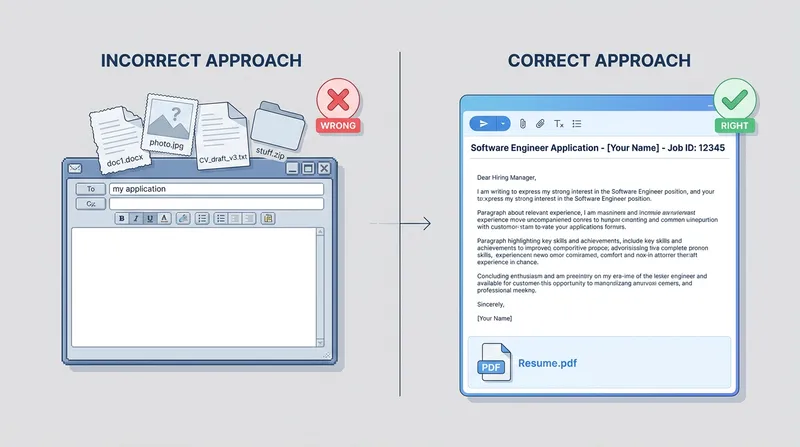
However, in the AU/NZ market, recruiters appreciate brevity. A full 400-word cover letter in an email can feel overwhelming on a mobile screen. The best approach is a hybrid: write a concise, punchy version of your cover letter (around 150 words) in the email body, and attach your resume.
If you struggle with writing this, JobSparrow's Intelligent Cover Letter Generator can create a hyper-personalized narrative that you can easily condense into a punchy email.
The Best Email Subject Line for Submitting a Resume
Your subject line has one job: to get the email opened. It must be clear, searchable, and professional. Do not try to be overly clever or use clickbait tactics.
Here is the standard formula you should always use: Job Title - Job Reference Number (if applicable) - Your First and Last Name
Examples of strong subject lines:
- Application: Senior Financial Analyst - Ref 4599 - Jane Doe
- Marketing Manager Position - John Smith Application
- Expression of Interest: Graphic Designer - Sarah Jenkins
If you are reaching out cold or applying for an unadvertised role, you need to be slightly more descriptive:
- Inquiry: IT Project Management Opportunities - David Chen
- Referral from [Connection Name]: Operations Manager Role - Lisa Wong
How to Format Your Job Application Email (File Types & Sizes)
Before we get to the templates, we must address the technical formatting. A great email is useless if the recruiter cannot open your attachment.
Research from TheLadders shows that recruiters spend an average of just 6 to 7 seconds looking at a resume. You do not have time for formatting errors or unreadable files.
Furthermore, Indeed emphasizes the critical importance of keeping file sizes under 10MB and strictly using PDF or .docx formats to ensure compatibility with employer systems.
Actionable Tips for Formatting:
- Always use PDF: Unless specifically asked for a Word document, send a PDF. It locks your formatting in place so it looks the same on a recruiter's Mac as it does on a hiring manager's PC.
- Name your file professionally: "Resume_Final_V3.pdf" looks sloppy. Use "FirstName_LastName_Resume.pdf".
- Keep it short: Keep the email body under 200 words.
- Professional email address: Use a clean email address (e.g., first.last@gmail.com). Drop the university email if you graduated more than three years ago.
Common Email Mistakes to Avoid
Before sending your application, ensure you are not making these frequent errors:
- Unprofessional email addresses: Always send from a clean, professional address (like first.last@gmail.com). Avoid nicknames or outdated university accounts.
- Vague subject lines: Using "Resume" or "Job Application" guarantees your email will get lost. Always include the job title and your name.
- Wrong file version: Double-check your attachment. Sending "Draft_Resume_2.pdf" looks disorganized.
- Forgetting the attachment: It happens to the best of us. Always attach your file before typing the recipient's email address.
- Overly long emails: Recruiters read on mobile devices. Keep your email body under 200 words to maintain their attention.
7 Job Application Email Templates for AU/NZ
The AU/NZ market values a tone that is direct, polite, and strictly professional. It avoids the overly aggressive, "hard-sell" style often seen in the US market. You want to project quiet confidence.
Template 1: The Standard Advertised Job
Use this when applying to a public job listing. It is brief and hits all the necessary points. According to Michael Page Australia, you should keep the email succinct by only introducing yourself, stating the job reference number, and outlining the attached documents.
Subject: Application: [Job Title] - [Reference Number] - [Your Name]
Dear [Hiring Manager Name or "Hiring Team"],
Please find attached my resume in application for the [Job Title] position, as advertised on [Platform/Website].
With over [Number] years of experience in [Industry/Field], I have a proven track record of [mention one major relevant achievement or skill, e.g., driving 20% revenue growth or managing enterprise software deployments]. I am particularly drawn to [Company Name] because of your recent work in [mention a specific company project or value].
My attached resume provides further details on how my background aligns with your current needs. I would welcome the opportunity to discuss how I can contribute to your team.
Thank you for your time and consideration.
Kind regards, [Your Name] [Your Phone Number] [Link to your LinkedIn Profile]
Template 2: How to Email a Hiring Manager Directly
If you have bypassed HR and found the hiring manager's email, you need to be highly respectful of their time. Focus on the value you bring.
Subject: Application: [Job Title] - [Your Name]
Hi [Hiring Manager's First Name],
I noticed your team is currently hiring for a [Job Title]. Knowing how busy your department is with the upcoming [mention a public company initiative or industry trend (Tip: check their LinkedIn page, recent press releases, or annual report for ideas)], I wanted to reach out directly.
I have spent the last [Number] years specializing in [Key Skill 1] and [Key Skill 2]. In my recent role at [Previous Company], I successfully [briefly state a major win with a metric].
I have attached my resume for your review. I would love to schedule a brief 10-minute call next week to see if my background aligns with your team's current goals.
Best regards, [Your Name] [Your Phone Number]
Template 3: Applying as a New Arrival or Migrant
Migrants often struggle with how to address visa status and local experience. The trick is to state your work rights upfront to remove friction, while framing your international experience as a global asset. (For more on tailoring your resume for migration, check out our guide on How to Write an Accountant Resume for Australian Migration).
Subject: Application: [Job Title] - [Your Name] - Full Working Rights
Dear [Hiring Manager Name],
I am writing to express my interest in the [Job Title] role at [Company Name].
I recently relocated to [City, e.g., Melbourne] and hold full, unrestricted working rights in Australia. I bring [Number] years of global experience in [Industry], most recently working in [Country] where I managed [mention a universally understood project or scale, e.g., a portfolio of Tier 1 corporate clients].
My international background has equipped me with highly adaptable problem-solving skills and a fresh perspective on [Key Industry Challenge]. I am eager to bring this expertise to the local market with a forward-thinking company like yours.
I have attached my resume for your consideration and look forward to the possibility of an interview.
Sincerely, [Your Name] [Your Phone Number]
Template 4: The Career Changer Bridge
When changing careers, your email body must immediately connect your past experience to the new role's core needs. Do not make the recruiter guess why you are applying.
Subject: Application: [Job Title] - [Your Name]
Dear [Hiring Manager Name],
I am submitting my resume for the [Job Title] position.
While my recent background is in [Current Industry], my core expertise lies in [Transferable Skill 1] and [Transferable Skill 2] (both of which are critical for success in your open role). For example, during my time as a [Current Title], I routinely [describe an action that perfectly mirrors the new job's requirements].
I am intentionally pivoting into [New Industry] and have been following [Company Name]'s growth closely. I am confident that my unique background will allow me to bring a fresh, highly analytical approach to your team.
My attached resume highlights these transferable skills in more detail. Thank you for your time.
Best regards, [Your Name] [Your Phone Number]
Template 5: Applying for Unadvertised Jobs (Cold Email)
This is a cold email recruiter template. When reaching out without a specific job listing, focus on networking and uncovering pain points. (Read more on this in our guide on How to Write an Expression of Interest).
Subject: Inquiry: Opportunities in [Department/Field] - [Your Name]
Hi [Name],
I have been following [Company Name]'s recent expansion into [mention a market or new product], and I am incredibly impressed by the work your team is doing.
I am a [Your Profession] with a strong track record in [Key Area of Expertise]. I am currently exploring new opportunities and wanted to see if you are anticipating any hiring needs in your department over the next few months.
I have attached my resume for context. Even if there are no current openings, I would love to connect and keep in touch for future opportunities.
Thank you for your time, [Your Name] [Your Phone Number]
Template 6: Short Email to Send With Resume
Optimized for mobile readers and busy executives, this template cuts straight to the chase.
Subject: [Job Title] Application - [Your Name]
Hi [Name],
I am writing to apply for the [Job Title] position.
I bring [Number] years of experience in [Key Skill], most recently delivering a [Metric/Result] improvement at [Previous Company]. I am highly familiar with your tech stack and can hit the ground running.
My resume is attached. I look forward to hearing from you.
Best, [Your Name] [Your Phone Number]
Template 7: The Follow-Up Message
If you have not heard back after a week or two, a polite follow-up is essential.
Subject: RE: Application: [Job Title] - [Your Name]
Hi [Name],
I hope you are having a great week.
I am following up on my application for the [Job Title] position submitted on [Date]. I remain very interested in the opportunity and am confident my background in [Key Skill] would be a strong addition to your team.
Please let me know if you need any additional information from my end.
Best regards, [Your Name]
How JobSparrow Supports Your Full Application Strategy
Knowing what to write in the email is only half the battle. The resume you attach must be flawless, tailored, and ATS-optimized. This is where JobSparrow's Offer Path methodology transforms your job hunt.
Unlike traditional CV writing services that charge hundreds of dollars for a single static document, JobSparrow is an AI career advisor that coaches you through the entire process.
Here is how our tools integrate with your email strategy:
- Smart Job Search & Recommendations: Before you even send an email, our AI surfaces the best opportunities tailored to your unique profile, saving you hours of scrolling.
- Master Career Profile: Store every achievement, project, and skill in one centralized database. You will never forget a metric again.
- Job-Specific Resume Tailoring: When you find a job you want, our AI analyzes the specific job description and intelligently selects the most relevant experience from your Master Profile. It rewrites your bullet points to match the job's keywords perfectly. You can download this as a clean, ATS-friendly PDF to attach to your email.
- Intelligent Cover Letter Generator: Cure "blank page syndrome." Generate a highly personalized cover letter in seconds, which you can easily condense into your email body.
- AI Mock Interviews: Once your perfectly crafted email lands you the interview, practice with our voice-led AI that simulates real interview scenarios based on the specific job description.
- AI Agent API: For power users, our public API allows external AI assistants (like Claude Desktop or Cursor) to help you apply for jobs through JobSparrow without ever leaving your preferred tool.
Your email strategy is now in place. The next step is ensuring the resume you attach is equally strong. Start with a free diagnosis to get your recruiter-lens score and see the exact gaps costing you interviews. Ready to go further? Unlock the full Offer Path for a one-time $129, with no subscription or auto-renewal. Learn more about Why single-purpose ATS resume tools fail.
Frequently Asked Questions
Should I put my cover letter in the body of the email or attach it?
Unless the job description specifically requests a separate attachment, it is best practice to include a condensed version of your cover letter (around 150 to 200 words) directly in the body of the email. This saves the recruiter a click and ensures your key selling points are seen immediately.
What is the best email subject line for submitting a resume?
Keep it simple and searchable. The best format is "Job Title - Job Reference Number (if applicable) - Your First and Last Name". Do not use vague subject lines like "Resume" or "Job Application", as these will get lost in a busy inbox.
How do I email a hiring manager directly without being annoying?
Be incredibly brief and focus entirely on the value you can bring to their specific team. Acknowledge that they are busy, highlight one major relevant achievement, and ask for a short exploratory call rather than demanding a formal interview.
What should a short email to send with a resume look like?
A short email should include a professional greeting, a one-sentence statement of the role you are applying for, one or two bullet points highlighting your most relevant achievements, and a polite call to action. Keep the total word count under 150 words.
How do I apply for unadvertised jobs via email?
When sending a cold email for an unadvertised job, focus on networking and uncovering pain points. Compliment a recent company initiative, state your core expertise, and ask if they anticipate any hiring needs in your department over the next few months.
What file format should I use when emailing my resume to HR?
Always use a PDF file format unless a Word document is explicitly requested. PDFs ensure that your formatting remains intact regardless of the device or operating system the recruiter is using. Ensure the file size is under 10MB to avoid bouncing back from corporate servers.
Take the Next Step in Your Career Journey
Sending your resume via email does not have to feel like a gamble. By optimizing your email body for the Shadow ATS, respecting the recruiter's time with a concise message, and attaching a hyper-tailored PDF, you drastically increase your chances of getting a response.
Ready to land more interviews? Stop guessing and start optimizing. Begin your journey with JobSparrow today. Start with a free diagnosis to see your recruiter-lens score.
Your next great opportunity is just one well-crafted email away.
Tags
Keep reading
Recommended articles.
resume tips · layoff
Resume After Layoff: How to Explain Redundancy (Without Looking Like a Hiring Risk)
Learn how to write a resume after layoff and explain redundancy confidently. Get ATS-friendly examples and proven tips to handle employment gaps.
ai resume builder · ats optimization
Are AI Resume Builders Worth It? Pros, Cons, and ATS Optimization in Australia
Are AI resume builders worth it? JobSparrow reveals the pros, cons, and ATS optimization tips to land more interviews in Australia without sounding robotic.
resume tips · gap year
How to Put Travel on Your CV: The AU/NZ Guide to Gap Years & Working Holidays
Learn how to format a working holiday visa resume and confidently explain a career break on your CV to beat the ATS and land AU/NZ job offers.