
ats friendly resume
ATS friendly resume: PDF or Word? (2026 guide to Workday, Taleo & ATS parsers)
By Job Sparrow Team
You have just spent hours perfecting your application. You upload your meticulously designed PDF resume to a Workday portal, hoping it is an ATS friendly resume, click the auto-fill button, and watch in horror as your entire work history is scrambled into complete gibberish. Your job titles are mixed with your university dates, your bullet points are mashed into one giant paragraph, and your contact information has vanished.
Now, you have to spend 20 minutes manually retyping everything you just uploaded.
If you have experienced this frustration, you are not alone. The debate over the best resume format for applicant tracking systems has plagued job seekers for years. In 2026, the rules have shifted again. With the rise of AI-driven recruiting software, understanding how to format your resume for specific systems is the difference between an instant interview and an automatic rejection.
At JobSparrow, our team has reviewed over 100,000 resumes and hired across four major markets, including Australia, New Zealand, Singapore, and Hong Kong. We look at applications through a recruiter lens. In this comprehensive guide, we will break down the exact ATS friendly resume format 2026 standards, explain why recruiters constantly ask for Word documents, and give you a definitive platform-by-platform breakdown for Workday, Taleo, iCIMS, and Greenhouse.
Start with a free CV diagnosis to see how your current format holds up against modern ATS scanners.
The core pain point: How an ATS resume scanner reads your file
Before we declare a winner between PDF and Word, you need to understand how an ATS resume scanner actually works.
When you upload a document to a company portal, the Applicant Tracking System (ATS) uses a technology called parsing to extract your information. It reads the document from left to right and top to bottom. It looks for standard headings like "Experience" or "Education" to categorize your text into a digital profile.
Resume parsing errors occur when the software encounters formatting it cannot understand. If you use a PDF created in a design program like Canva, the text might be saved as an image or placed in floating text boxes. The ATS cannot read images. It tries to force the floating boxes into a linear structure, which results in the scrambled auto-fill disaster you see on your screen.
Should I use PDF or Word for my resume?
The short answer is that it depends entirely on how you are applying and who is receiving the document. There is no universal best format, but there are strict rules for specific scenarios.
As noted by Adobe, while PDFs preserve visual formatting across all devices, a Word document (.docx) is best when applying through older ATS systems or when an employer specifically requests it.
Pros and cons of PDF resumes
Pros:
- Visual consistency: A PDF looks exactly the same on a Mac, a PC, or a mobile phone.
- No accidental edits: Recruiters cannot accidentally delete a line of your experience while reviewing your file.
- Professional appearance: It feels like a finished, polished product.
Cons:
- Parsing risks: Highly designed PDFs often fail ATS text extraction.
- Inflexible for recruiters: Agency recruiters cannot easily format a PDF to present to their clients.
Pros and cons of Word resumes
Pros:
- Maximum ATS compatibility: Word documents are text-native, making them incredibly easy for any ATS to parse.
- Recruiter friendly: External staffing agencies prefer Word so they can edit the document.
- Easy to update: You can make quick text changes without needing design software.
Cons:
- Formatting shifts: A Word document might look different depending on the version of Microsoft Office the recruiter is using.
- Less design freedom: Word is not built for complex visual layouts.
Platform-by-platform breakdown (2026 guide)
Not all applicant tracking systems are created equal. A format that works perfectly on Greenhouse might fail miserably on Taleo. Here is the definitive guide to the major platforms.
Best resume format for Workday ATS
Workday is notorious among job seekers for its clunky application process. So, does Workday read PDF resumes? Yes, but with a major caveat. Workday can read simple, text-based PDFs, but it struggles heavily with complex layouts.
Data highlighted by iReformat reveals that enterprise ATS platforms like Workday parse Word documents more accurately than PDFs. If you want to avoid manually typing your work history, the best resume format for Workday ATS is a standard Microsoft Word document (.docx).
The Auto-Fill Test: You can check resume ATS compatibility instantly using Workday. Upload your document and click auto-fill. If the fields populate correctly, your format is safe. If it produces gibberish, you need to simplify your formatting immediately.
Taleo ATS resume format
Taleo is an older, legacy ATS used by many large corporations, government bodies, and healthcare institutions. It has one of the strictest parsing engines on the market.
For Taleo, you must prioritize function over form. The ideal Taleo ATS resume format is a plain Word document. Taleo frequently chokes on PDF files, especially those with custom fonts or graphics. If you are applying to a company that uses Taleo, strip away all design elements, remove headers and footers, and submit a clean .docx file.
iCIMS resume format: PDF or Word
iCIMS is a robust system that handles parsing better than Taleo. When deciding on an iCIMS resume format PDF or Word, you have a bit more flexibility.
iCIMS can accurately parse text-based PDFs, provided they are formatted in a single column. However, if you experience resume parsing errors in iCIMS, it is usually because you have used text boxes or tables. If your PDF is simple, it will work fine. If you are unsure, default to Word.
Greenhouse ATS resume format
Greenhouse is a modern, recruiter-friendly ATS heavily favored by tech companies and startups. It is designed to be seamless for both the applicant and the hiring team.
The best Greenhouse ATS resume format is PDF. Greenhouse has an excellent parsing engine that rarely struggles with standard PDFs. More importantly, Greenhouse displays your resume in an embedded viewer for the hiring manager. A PDF ensures that your document looks beautiful and professional in that viewer, whereas a Word document might lose its formatting in the browser.
Not sure which format your resume is using? Upload it for a free recruiter-lens diagnosis and find out in minutes.
The recruiter perspective: Why do recruiters ask for Word resumes?
If you are job hunting in Australia, New Zealand, Singapore, or Hong Kong, you will likely interact with third-party recruitment agencies (like Hays, PageGroup, or Robert Walters). You might have noticed a frustrating trend. You send them a beautiful PDF, and they immediately reply asking for a Word version.
Why do recruiters ask for Word resumes? It is a business requirement, not a personal preference.
Insights from Adecco clarify that recruiters require Word files because they need to edit the resume to add their staffing agency logo, reformat it for the client, and remove the candidate's personal contact information.
Agency recruiters act as intermediaries. If they send your resume to a client with your phone number and email address on it, the client could bypass the agency and hire you directly, costing the recruiter their commission. They need a Word document so they can easily strip out your contact details, add their agency cover page, and present a uniform document to the hiring manager.
If you refuse to send a Word document, the recruiter simply cannot represent you. Always keep a clean, text-based Word version of your resume ready for agency applications.
The multi-column myth: Why beautiful templates cause resume parsing errors
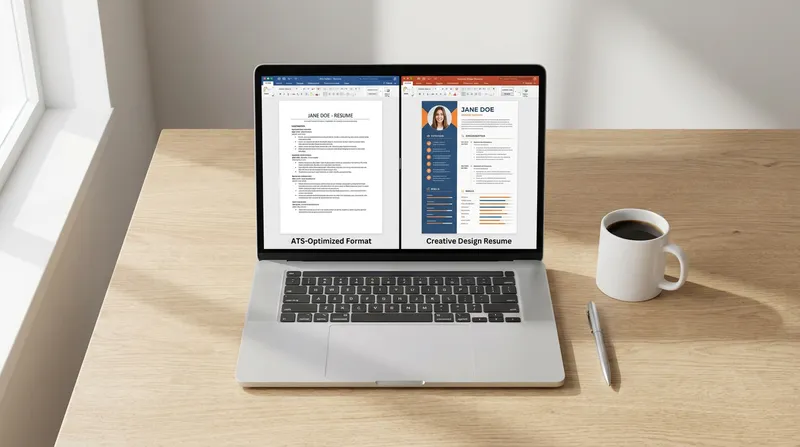
One of the biggest mistakes modern job seekers make is using highly designed, multi-column templates. These templates look fantastic to the human eye, but a multi-column resume ATS scan is almost always a failure.
Remember that an ATS reads left to right. If you have a left column with your skills and a right column with your experience, the ATS will read straight across the page. It will combine your skills and your job duties into one nonsensical sentence.
According to guidelines from the University of Illinois Chicago (UIC), not all ATS systems can read perfectly, and simple Word documents without headers, footers, or tables are often the safest choice.
If you are a career changer or a migrant trying to map foreign experience to the local market, clarity is your biggest asset. You can read more about structuring your experience effectively in our ACS Skills Assessment Resume Guide or our guide on How to Write a Resume With No Degree. Do not let a fancy layout hide your valuable transferable skills.
How to format a resume for Workday and other ATS
To ensure your application survives the initial scan, you need to follow strict formatting rules. Here is how to create an ATS friendly resume format 2026:
- Use a single column layout: Stick to a traditional, top-to-bottom reading order. Never use sidebars or multi-column designs.
- Avoid tables and text boxes: Do not use tables to organize your skills. Use standard bullet points instead.
- Use standard fonts: Stick to universally recognized fonts like Arial, Calibri, Times New Roman, or Garamond. Custom fonts can cause parsing errors.
- Keep headers simple: Use standard section titles like "Work Experience," "Education," and "Skills." Do not get creative with titles like "My Professional Journey" or the ATS will not know where to file the information.
- Remove graphics and icons: Do not use logos, headshots, or icon graphics for your contact information. The ATS cannot read them.
- Do not put info in the header/footer: Many ATS parsers completely ignore the header and footer margins of a Word document. Put your contact information in the main body text.
- Save correctly: If saving as a PDF, ensure it is a "text-based" PDF (usually saved directly from Word or Google Docs). Never print your resume and scan it back in as an image PDF.
If you are an older worker worrying about formatting trends, keeping it simple is actually your best defense. You can find more specific advice in our Mature Age Resume Tips guide.
JobSparrow's solution: Stop guessing and start applying
You should be spending your energy preparing for interviews, not fighting with file formats. Navigating ATS compatibility, formatting rules, and recruiter preferences is exhausting.
JobSparrow removes this friction entirely by guiding you through our complete Offer Path framework: Diagnose, Position, Execute, Prepare, and Close. We are not just a resume formatter; we are your full-journey career advisor.
It starts with a free CV diagnosis to identify exactly what is holding you back. From there, you build a Master Career Profile. From this single source of truth, our AI generates perfectly formatted, ATS-optimized resumes in seconds.
When you use JobSparrow's Instant Resume or Job-Specific Tailoring features, you do not have to worry about parsing errors. You can download your tailored resume as either a PDF (perfect for direct applications and Greenhouse) or a DOCX file (perfect for agency recruiters and Workday) with one click.
Beyond formatting, our Job Application Tracking feature provides a Match Score and Gap Analysis dashboard so you always know how you stack up against a specific job description. Once you land the interview, you can practice your delivery with our AI mock interviews.
Ready to land more interviews? Start with a free diagnosis to see your recruiter-lens score. When you are ready, unlock the full Offer Path.
Frequently asked questions
Does Workday read PDF resumes accurately?
Workday can read simple, single-column PDFs that are text-based. However, it frequently struggles with highly designed PDFs, resulting in scrambled auto-fill data. For the smoothest experience on Workday, a Word document (.docx) is highly recommended.
Why do recruiters ask for Word resumes instead of PDF?
Third-party agency recruiters need to edit your document. They must remove your personal contact information (to protect their commission) and add their agency branding before presenting your profile to their corporate client. They cannot easily do this with a PDF.
Is a multi-column resume ATS friendly?
No. ATS parsers read text from left to right and top to bottom. A multi-column layout causes the scanner to read across the columns, mixing your skills and experience into incomprehensible sentences. Always use a single-column layout for online applications.
What is the best resume format for Taleo ATS?
Taleo is an older system with strict parsing limitations. The absolute best format for Taleo is a plain Microsoft Word document (.docx) with zero tables, graphics, or text boxes.
How do I fix resume parsing errors in iCIMS?
If your resume is parsing incorrectly in iCIMS, you likely have hidden formatting issues. Remove all text boxes, tables, columns, and graphics. Ensure your section headings are standard (e.g., "Experience," "Education"). Save the file as a clean Word document and try uploading again.
Can an ATS read a PDF saved from Canva?
Usually, no. Canva is a graphic design tool, and it often exports text as vector images or places them in floating design blocks. Most ATS scanners cannot extract text from Canva PDFs accurately, leading to immediate parsing failures. Stick to resumes built in Word, Google Docs, or a dedicated ATS-friendly builder like JobSparrow.
Tags
Keep reading
Recommended articles.
chatgpt resume · ai resume
How to Use ChatGPT to Write a Resume (Without Sounding Robotic or Getting Rejected)
Learn how to use ChatGPT to write a resume without sounding robotic. Avoid AI mistakes, beat ATS parsers, and land more interviews. Get a free diagnosis.
resume tips · recruiter outreach
Recruiter Asked for Your CV? How to Generate a Targeted Resume Without a Job Description
No job description? No problem. Learn how to generate a targeted resume in seconds and see your recruiter-lens score free: no JD required.
background check · employment verification
Background Check Discrepancy With Resume: How to Fix It | JobSparrow
Facing a background check discrepancy with resume dates or titles? Fix employment verification mismatches fast with our scripts and proof checklists.