
chatgpt resume
How to Use ChatGPT to Write a Resume (Without Sounding Robotic or Getting Rejected)
By Job Sparrow Team
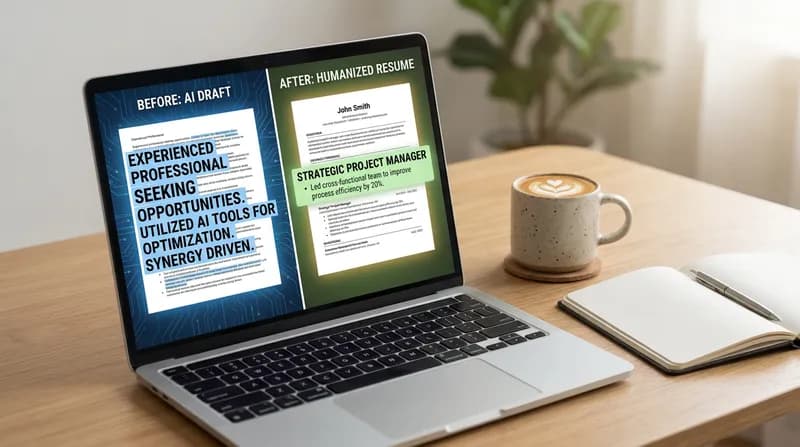
You are exhausted. You have sent out 50 applications this month, and all you hear is radio silence. The temptation to use artificial intelligence to speed up the process is incredibly strong. You want to save time, but you are also terrified. You know that if you use basic prompts, your application will sound like a machine wrote it, and you risk getting instantly rejected by human recruiters or flagged by AI detection tools.
This is the core problem for modern job seekers. The tools designed to make your life easier often create generic, flat, and robotic applications. Recruiters can spot these from a mile away. However, you do not have to choose between spending hours writing manual cover letters and submitting a robotic application. You can leverage technology efficiently while maintaining your authentic human voice.
In this guide, we will explore exactly how to use ChatGPT to write a resume, the common mistakes that lead to rejection, and how a context-aware approach can help you land more interviews.
The AI dilemma: how to use ChatGPT to write a resume without sounding like a robot
Applying for jobs is a numbers game, but it is also a quality game. When you are applying to dozens of roles, the sheer volume of writing required is overwhelming. It is completely natural to turn to ChatGPT for help.
The issue arises when job seekers treat generative AI as a magic wand rather than a drafting tool. If you paste a job description into a chat window and type "write a resume for this job", the output will be structurally correct but entirely devoid of personality. It will lack the specific nuances of your industry, the measurable metrics of your past success, and the cultural tone required for your local market.
Your goal is not just to generate text. Your goal is to position yourself as the best candidate for the role. To do this, you need to understand how to use ChatGPT to write a resume that highlights your unique career narrative. You must learn to guide the AI, edit its outputs aggressively, and inject the human context that algorithms simply do not possess.
Why recruiters are rejecting ChatGPT resumes today
To understand how to write an ATS friendly AI resume, you must look at the process through a recruiter lens. JobSparrow is built by people who have actually done the hiring across Australia, New Zealand, the United States, Singapore, and Hong Kong. We have reviewed over 100,000 resumes, and we can tell you this: recruiters are not anti-technology. They are anti-spam.
Hiring managers want to see your specific context, your actual achievements, and your authentic voice. When you submit a raw, unedited AI output, you are signaling to the recruiter that you did not care enough to tailor your application. The consequences of this are measurable. According to data from the U.S. Chamber of Commerce, nearly 20% of recruiters say they would reject a job candidate who used an AI-generated resume or cover letter.
Furthermore, hiring professionals are highly skilled at spotting the difference between human writing and machine generation. Research from Dartmouth College confirms that recruiting managers estimate that easily 25% of applications appear to be AI-generated, and recruiters can definitely tell.
One of the biggest red flags for a hiring manager is a mismatch in tone. If your resume reads like a highly polished corporate robot wrote it, but your portfolio or initial phone screen reveals a completely different communication style, you break trust with the interviewer. This is exactly Why Recruiters Reject Disjointed Applications (And How an AI Resume and Cover Letter Creator Fixes It). Consistency across your entire application is crucial.

The 5 biggest ChatGPT resume mistakes (and how to fix them)
If you want to humanize a ChatGPT resume, you must first understand the common pitfalls that give you away. Here are the five biggest mistakes job seekers make when using standard generative AI, and actionable tips on how to fix them.
Mistake 1: leaving in AI tell phrases
Recruiters read hundreds of applications a week. They have developed an allergy to specific words that ChatGPT overuses. These "AI tell phrases" instantly flag your document as machine-generated.
- Words to avoid: Delve, testament to, dynamic synergy, navigating the complexities, pivotal role, multifaceted, and orchestrate.
- The fix: Use a simple find-and-replace tool. Swap "delve" with "research". Swap "orchestrate" with "manage" or "lead". Speak clearly and plainly.
Mistake 2: hallucinated skills and metrics
Generative AI is designed to please you. If you ask it to make your resume look impressive, it might invent numbers or skills you do not actually possess. As noted by Austin Community College, without your input and edits, a ChatGPT resume might insert filler skills or fabricate achievements entirely.
- The fix: Never allow the AI to guess your metrics. Provide exact numbers in your prompts (e.g., "I increased sales by 15% over six months").
Mistake 3: the context vacuum
Asking a chatbot to "make this sound professional" strips away your unique industry context. A marketing resume should sound different from a software engineering resume. Standard AI tends to blend everything into a generic corporate tone.
- The fix: Tell the AI exactly who your audience is. For example, "Rewrite this bullet point for a Senior Product Manager role, focusing on agile methodologies."
Mistake 4: keyword stuffing
Many applicants try to beat the Applicant Tracking System (ATS) by asking AI to cram as many keywords as possible into a single paragraph. This results in an unreadable mess for the human who eventually reviews it.
- The fix: Ask the AI to identify the top three skills in the job description, and weave only those three naturally into your existing achievements.
Mistake 5: the blank page prompt
Starting from scratch with a prompt like "Write a resume for a graphic designer" is a recipe for disaster. The AI has no historical data about your career to draw from. This is a classic case of Resume Blank Page Syndrome: How an AI Coach Extracts Your Forgotten Achievements.
- The fix: Always provide a foundation. Paste your current resume or a detailed list of your past responsibilities before asking the AI to generate anything new.
Note: JobSparrow's AI Coach was built specifically to solve this. Instead of staring at a blank page, our AI asks you the right questions, then automatically builds your profile from your answers.
Unsure if your resume has these AI red flags? Get your free recruiter-lens score on JobSparrow before you apply.
How to tailor your resume with ChatGPT (the right way)
Tailoring your application is the single most effective way to increase your interview rate. According to internal data, generic applications have a drastically lower success rate, while tailored applications can significantly increase response rates. Here is the step-by-step method to tailor your resume with ChatGPT effectively.
Step 1: build a comprehensive master profile first
You cannot get a good output if you do not provide good input. Before you write a single prompt, you must feed the AI your entire career history. Create a document that contains every job you have held, every project you have completed, and every metric you have achieved. Paste this massive document into the AI and tell it to "memorize" this information for the current session.
Step 2: provide context-rich ChatGPT resume prompts
Once the AI knows your history, you can start generating tailored content. Here are three of the best ChatGPT prompts for resume writing that you can copy and paste:
- For bullet points: "Act as an expert technical recruiter. Review the following job description [paste JD]. Now, select the most relevant achievements from my career history [paste history] and write four bullet points for my most recent role. Use the STAR method (Situation, Task, Action, Result). Do not use words like delve, synergy, or testament."
- For the summary: "Write a 3-sentence professional summary tailored to this job description [paste JD]. Focus on my five years of experience in B2B sales and my track record of exceeding quotas. Keep the tone confident but understated."
- For a career change: "I am transitioning from teaching to corporate training. Review this job description [paste JD]. Rewrite my teaching achievements to highlight transferable skills like curriculum development, stakeholder management, and public speaking. Avoid academic jargon."
Step 3: localize and humanize the output
If you are a migrant or a career changer, especially in markets like Australia, New Zealand, the UK, or the US, you must adjust the tone to fit local business culture. For example, Australian employers often prefer a straightforward, collaborative tone and tend to reject candidates who sound overly boastful. Learning about Resume Localization for AU/NZ: How Migrants Can Use AI to Adapt Tone & Beat 'Tall Poppy Syndrome' is essential for international job seekers.
Read the generated text out loud. If it sounds like something a robot in a sci-fi movie would say, rewrite it in your own words.
Want to skip the manual prompting entirely? JobSparrow builds your Master Career Profile and generates a tailored, ATS-optimized resume in under 60 seconds. Start with a free diagnosis.
Creating an ATS friendly AI resume: balancing bots and humans
There is a fascinating paradox in modern recruitment. Candidates are heavily penalized for using AI to write their applications, yet recruiters are actively using AI to screen those same applications. According to industry leaders at Coursera, many recruiters use ChatGPT to draft job descriptions, generate candidate outreach messages, and screen large quantities of candidate resumes.
Because recruiters are using AI to parse your data, you must ensure your document is an ATS friendly AI resume. However, modern parsers do not just look for exact keyword matches anymore. They look for semantic meaning and context.
Instead of just listing "Project Management" at the bottom of your resume, you need to show the AI parser how you used that skill. A good bullet point reads: "Managed a cross-functional team of 12 using Agile methodologies to deliver the software update two weeks ahead of schedule." This naturally incorporates chatgpt resume keywords while providing the context that human recruiters demand.
Always review your final document through a recruiter lens. Ask yourself if the format is clean, if the impact is clear, and if the keywords flow naturally. To understand exactly what modern parsing systems are looking for, read our guide on Workday Illuminate 2026: The Exact Resume Format to Pass Parsers and Semantic AI. By integrating your application materials with smart tracking tools, you can ensure a seamless job hunt. Discover how to streamline your process by reading about how to Stop Manual Data Entry: Why the Best Job Tracker Apps Now Use AI Skill Matching.
The master profile method: stop managing 50 resume versions
Manually prompting ChatGPT for every single job application is exhausting. You have to repeatedly feed the AI your work history, tweak the prompts, and aggressively edit the output. This manual process often leads to version control nightmares on your desktop.
Instead of managing 50 different Word documents, you need a centralized database of your career. We call this the Master Profile. By keeping all your achievements, metrics, and context in one place, you can generate highly targeted resumes in minutes rather than hours. This approach is detailed in our article on The 'Master CV' Method: Why Managing 50 Resume Versions is Sabotaging Your Job Search.
The JobSparrow solution: AI that actually sounds like you
The quality of any AI output is directly limited by the quality of the context you provide, and most job seekers provide almost none. JobSparrow was built to solve this exact problem.
JobSparrow does not just generate a resume; it coaches you through the entire five-stage Offer Path: Diagnose, Position, Execute, Prepare, and Close. Instead of acting as a simple writing tool, JobSparrow serves as your comprehensive AI career advisor.
It starts with a free recruiter-lens diagnosis. Then, our platform builds your Master Career Profile. Our AI Coach features a Gap Filler that does not wait for you to remember your achievements. It analyzes your profile, identifies missing metrics and vague descriptions, and asks you targeted questions to fill them in. Your answers are automatically woven back into your profile, so every resume you generate is built on a stronger foundation.
When you are ready to apply for a job, our system analyzes the specific job description, provides a Match Score and Gap Analysis in the Job Tracker, and intelligently selects the most relevant experience. You can generate an Instant Resume, choosing from five professionally designed templates (Professional, Two Column, Elegant, Colorful, Contemporary) that can be downloaded in PDF or DOCX formats. The result is a personalized AI resume that passes the ATS and reads beautifully for human eyes. Furthermore, JobSparrow prepares you for the final stages with AI Mock Interviews tailored to your specific application.
Experts agree that human context is irreplaceable. As noted by recruitment experts at the Tandym Group, over-reliance on AI often leads to generic resumes that recruiters recognize immediately; the strongest resumes combine AI support with personal experience and authentic voice.
Start with a free recruiter-lens diagnosis (no credit card required). Unlock the full Offer Path, including unlimited tailored resumes and cover letters.
Ready to land more interviews? Start with a free diagnosis on JobSparrow. See your recruiter-lens score and discover the exact gaps costing you interviews in minutes.
Frequently asked questions
Can recruiters tell if I used ChatGPT to write my resume?
Yes. Recruiters can easily spot AI tell phrases like "delve" or "testament to", as well as generic formatting and hallucinated metrics. You must humanize the output by editing heavily and injecting your specific career context.
Will my resume get rejected if I use AI?
It will get rejected if it sounds robotic, lacks specific context, or contains fabricated information. If you use AI as a drafting tool and edit the final document for authenticity, it will not be rejected solely for using AI assistance.
What are the best ChatGPT prompts for resume writing?
The best prompts include your specific target job description, your comprehensive work history, and explicit instructions on tone. Always instruct the AI to avoid corporate jargon and focus on measurable outcomes using the STAR method.
How do I make my AI resume ATS friendly?
Focus on semantic matching rather than keyword stuffing. Ask the AI to identify core skills in the job description and naturally weave those exact terms into your existing achievements, proving how you used the skill in a real-world scenario.
Is there a better alternative to standard ChatGPT for resumes?
Yes. Dedicated AI career advisors like JobSparrow use a Master Profile system to retain your unique career context. This ensures the output is highly tailored, ATS-optimized, and free of the robotic cliches that plague standard chatbots.
Tags
Keep reading
Recommended articles.
career change · resume tips
The Master Profile Strategy: How to Write a Career Transition Resume Without Erasing Your Past
Learn how to write a career change resume that highlights transferable skills and preserves your seniority using the hybrid format and master profile strategy.
internal promotion · ats resume
How to Update Your Resume for an Internal Promotion (And Pass the ATS)
Applying for an internal promotion? JobSparrow shows you how to write a resume that beats the ATS and wins the role. Start your free diagnosis today.
ats friendly resume · resume parsing errors
ATS friendly resume: PDF or Word? (2026 guide to Workday, Taleo & ATS parsers)
Discover the best ATS-friendly resume format for 2026. Learn whether Workday, Taleo, and recruiters prefer PDF or Word, and fix parsing errors today.