
ai resume builder
Best AI Resume Builders Australia 2026: We Tested 7 Top Tools
By Job Sparrow Team

Feeling overwhelmed by the job market? You've meticulously crafted your experience, only to send your resume into the 'black hole' of online applications and hear nothing back. You're not alone. The core anxiety for job seekers in Australia and New Zealand isn't a lack of skill, it's a lack of confidence in the process. You're facing automated Applicant Tracking Systems (ATS), wrestling with 'free' tools that suddenly demand payment, and wondering if any AI builder truly understands the nuances of the Australian market.
This isn't another list that just rehashes marketing claims. We address the core pain point of distrust and uncertainty head-on. We've put the top 7 AI resume builders to the test against a real Australian job ad to find out which ones actually deliver on their promises in 2026. We'll break down the features, expose the hidden costs, and give you the clarity you need to choose the right tool to land your next role.
Ready to skip the analysis and see how your resume stacks up? Upload your CV to JobSparrow and get a tailored application ready in minutes.
What Makes a Great AI Resume Builder for Australia in 2026?
Before we dive into our test results, it's crucial to understand what separates a gimmick from a game-changer. A top-tier AI resume builder for the Australian market needs to do more than just fill in a template. It must be a strategic partner.
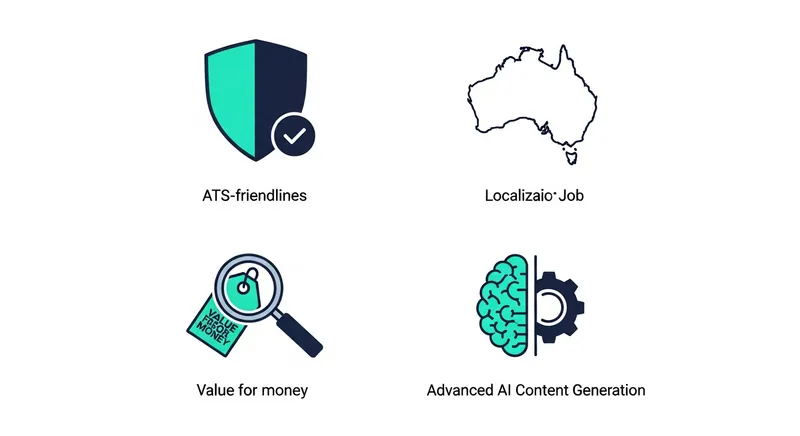
Key Pillars of a Winning AI Builder:
- Flawless ATS Compatibility: Up to 75% of resumes are rejected by an ATS before a human ever sees them. According to The University of Sydney's careers service, passing this initial software scan is your first hurdle. A great AI builder must produce clean, single-column, parsable formats and help you integrate keywords naturally.
- True Australian Localisation: Many tools claim to be for Australia, but this must go deeper than changing the spelling of 'organise'. A truly local tool understands the specific requirements of Australian employers. For instance, the Australian Public Service Commission outlines the need for a 'pitch' and addressing selection criteria using the STAR method, something a generic AI might miss.
- Intelligent Content Generation: The AI should act as your personal career coach, helping you turn simple duties into impressive, metric-driven achievements. It should prompt you to quantify your impact, suggesting powerful action verbs and phrasing that resonates with recruiters.
- Transparent Value for Money: The 'freemium' model is a major source of frustration. A trustworthy builder is upfront about what's free and what's included in a paid plan. The goal is to find a tool where the investment clearly translates into a better-quality application and more interview opportunities.
The Ultimate Showdown: Our Testing Methodology
To cut through the noise, we created a persona: a Project Manager with 8 years of experience in logistics, looking to transition into the tech sector. We took a real Senior Project Manager job ad from Atlassian on SEEK and used our persona's information to build a resume on seven of the most popular platforms.
We evaluated them on:
- Ease of Use & Speed: How quickly could we get a professional first draft?
- AI Quality: How well did the AI rewrite bullet points and suggest relevant skills?
- ATS Score: We ran the final resume through an independent ATS checker to get a keyword and formatting match score out of 100.
- Final Design: Did the resume look modern and professional?
- True Cost: What did we actually have to pay to get a usable, watermark-free PDF?
The Contenders: A Head-to-Head Comparison
Here are the results of our hands-on testing.
1. Canva
- Our Verdict: A designer's playground with a basic AI writer bolted on. Great for visually stunning resumes, but a high-risk choice for passing modern ATS.
- Test Results: ATS Score: 58/100. The two-column template we chose was flagged for parsing errors. The AI suggestions were generic and didn't align with the job ad's keywords.
- What We Liked: Unmatched design flexibility and a huge library of beautiful templates. The 'Magic Write' feature can offer basic text suggestions for brainstorming.
- Where It Falls Short: The focus is on aesthetics, not content strategy or ATS optimization. Many visually complex templates with columns, tables, and graphics can confuse ATS scanners.
- Best For: Creatives or those in industries where a visually unique resume is an advantage and ATS is less of a concern.
- True Cost: Many of the best templates and the full 'Magic Write' feature require a Canva Pro subscription.
2. Resume.io
- Our Verdict: A solid, user-friendly builder with professional templates that are generally ATS-friendly. A safe, if uninspired, choice.
- Test Results: ATS Score: 79/100. The classic, single-column format passed the ATS check easily. The AI provided pre-written phrases that were decent but needed significant manual tweaking to match the Atlassian job ad.
- What We Liked: The interface is clean and intuitive. It offers pre-written phrases which can be helpful for overcoming writer's block. The Job Tracker is a nice bonus.
- Where It Falls Short: The 'AI' is more of a suggestion library than a smart, context-aware writer. To get a usable PDF without a watermark, you must subscribe.
- Best For: Job seekers who want a classic, professional-looking resume and don't need advanced AI-driven content tailoring.
- True Cost: Free to build, but a subscription is required to download a watermark-free PDF.
3. Kickresume
- Our Verdict: A strong all-rounder with a good balance of design and AI capability, but the best features are locked behind a paywall.
- Test Results: ATS Score: 84/100. Most templates are ATS-friendly. The AI writer did a fair job of generating bullet points, but struggled to quantify achievements without specific user prompts.
- What We Liked: Good template variety, AI writer for generating ideas, and a helpful 'Resume Score' feature. The ability to import from LinkedIn is a time-saver.
- Where It Falls Short: The free version is very limited. You can only download once in a basic format, and advanced AI and design features require a subscription.
- Best For: Users who want a guided experience with decent AI and are willing to pay for premium features.
- True Cost: A subscription is necessary for multiple downloads, premium templates, and the full AI toolkit.
4. Rezi
- Our Verdict: A technically focused builder obsessed with ATS keywords. It's powerful but has a steeper learning curve and less design flexibility.
- Test Results: ATS Score: 91/100. Rezi excelled here, with a real-time keyword targeting tool that helped us align perfectly with the job description. The AI content was highly optimized.
- What We Liked: The emphasis on ATS optimization is top-notch. The AI keyword targeting feature is genuinely useful for tailoring applications.
- Where It Falls Short: The interface is less intuitive than others, and the template designs are very rigid and utilitarian. The focus is purely on function over form.
- Best For: Tech professionals, engineers, and anyone applying to large corporations where beating the ATS is the primary goal.
- True Cost: Offers a limited free plan. A subscription is needed for unlimited resumes, downloads, and full access to AI credits.
5. MyPerfectResume
- Our Verdict: A guided experience that holds your hand, but uses aggressive and frustrating upselling tactics.
- Test Results: ATS Score: 75/100. The final product was decent and ATS-friendly, but the process was painful. We spent 30 minutes building the resume only to hit a hard paywall.
- What We Liked: The step-by-step wizard is great for absolute beginners. It provides job-specific content suggestions.
- Where It Falls Short: The 'free' offering is a classic bait-and-switch. You cannot download a usable document without paying, making the initial time investment feel wasted.
- Best For: Beginners who are aware of the cost upfront and are willing to pay for a highly structured, guided process.
- True Cost: A subscription is required for almost all useful features, including downloading a PDF.
6. Teal
- Our Verdict: A comprehensive job search tracker with a solid resume builder included. It's more of a career management platform than a simple builder.
- Test Results: ATS Score: 88/100. The keyword matching tool (in the Chrome extension) is excellent for analysis. The resume builder creates clean, ATS-friendly documents.
- What We Liked: The all-in-one platform for tracking jobs, contacts, and resumes is powerful. The Chrome extension for pulling job details and matching keywords is a standout feature.
- Where It Falls Short: The resume builder itself is less feature-rich than dedicated tools. The main value is in the entire ecosystem, which might be overkill for some.
- Best For: Highly organized job seekers who want a single platform to manage their entire job search from start to finish.
- True Cost: A generous free plan is available. The paid 'Teal+' unlocks unlimited features and advanced capabilities.
7. JobSparrow (Our Tool)
- Our Verdict: The only platform truly built for job-specific tailoring at scale. It uses a 'Master Profile' to create uniquely tailored resumes and cover letters in minutes.
- Test Results: ATS Score: 95/100. By analyzing the SEEK job URL directly, the AI selected the most relevant points from our Master Profile and rewrote them using keywords from the ad, achieving the highest match score.
- What We Liked: The Master Profile concept saves immense time. The AI's ability to analyze a live job ad and tailor content specifically for it is a game-changer. The integrated cover letter writer and interview prep tools create a complete application workflow.
- Where It Falls Short: As a dedicated application-tailoring tool, it doesn't offer the broad template design variety of a tool like Canva. The focus is on content and efficiency over visual creativity.
- Best For: Serious job seekers in professional or corporate roles who apply to multiple jobs and want the highest quality, tailored application for each one.
- True Cost: A free plan is available for building your Master Profile and limited tailoring. A subscription unlocks unlimited job-specific tailoring, cover letters, and interview prep.
Comparison Summary
| Tool | Best For | ATS Score (Our Test) | True Cost to Download PDF | Key Feature |
|---|---|---|---|---|
| JobSparrow | Quality & Speed for Multiple Applications | 95/100 | Free (with limits) / Paid | Job-Specific AI Tailoring |
| Rezi | Maximum ATS Keyword Optimization | 91/100 | Free (with limits) / Paid | Real-time Keyword Analysis |
| Teal | All-in-One Job Search Tracking | 88/100 | Free / Paid | Job Tracker & Chrome Extension |
| Kickresume | Balanced Design & AI for General Use | 84/100 | Paid | AI Writer & Templates |
| Resume.io | Classic, Professional Templates | 79/100 | Paid | Simple Interface |
| MyPerfectResume | Guided Process for Absolute Beginners | 75/100 | Paid | Step-by-Step Wizard |
| Canva | Creative & Visually Unique Resumes | 58/100 | Free / Paid | Unmatched Design Flexibility |
The Migrant & Career Changer's Dilemma
Most AI builders are designed for a standard career path, but what if your journey is different? This is where many tools fail.
For Migrants: Translating Your Experience
Moving to Australia means translating your professional history for a new audience. Generic AI often struggles with this. For instance, if you were a 'Chartered Accountant' in the UK, an AI might not know to reframe this as a 'CPA-equivalent financial professional' for Australian employers, emphasizing IFRS experience that translates directly. The best approach is to use AI as a starting point, then manually refine it based on advice from authoritative sources like SEEK's career advice. Remember to remove personal details like photos and date of birth, which are not standard on Australian resumes.
For Career Changers: Highlighting Transferable Skills
If you're changing careers, your challenge is to show how past experience is relevant to a new field. A powerful AI can help identify and reframe your skills. For example, a 'Retail Store Manager's' experience in 'managing inventory and staff rosters' can be reframed for a project management role as 'resource allocation and timeline management for projects impacting 15+ stakeholders.' For a deep dive on this, our guide on How to Write a Career Change Resume provides a framework you can use with any AI tool.
The Freemium Trap: What 'Free' Really Costs You
One of the biggest pain points for job seekers is the 'freemium' trap. Many builders advertise as free, but you only discover the truth after you've invested time. Here is a transparent breakdown based on our tests:
| Tool | What's Genuinely Free? | What's Behind the Paywall? |
|---|---|---|
| JobSparrow | Building Master Profile, limited AI suggestions & downloads | Unlimited job-specific tailoring, cover letters, interviews |
| Teal | Job tracker, basic resume builder, unlimited keywords | Advanced resume analytics, unlimited email templates |
| Rezi | 1 resume, limited AI credits, .txt download | PDF downloads, more AI credits, advanced ATS features |
| Canva | Building & downloading with free templates | Premium templates, full AI writer, advanced design tools |
| Kickresume | 1 basic download, limited AI phrases | PDF downloads, premium templates, full AI writer |
| Resume.io | Building the resume, sharing a link | Downloading a PDF/Word doc without a watermark |
| MyPerfectResume | Building the resume, downloading as a .txt file | Downloading a professionally formatted PDF/Word doc |
Your Path to Landing the Job
The 2026 job market is powered by AI, for both applicants and employers. Choosing the right tool isn't just about creating a document; it's about building a strategy. While many builders offer a quick fix, they often fall short in providing the deep, tailored, and trustworthy support that job seekers truly need.
The most effective approach is to use a comprehensive platform that partners with you throughout your entire job search. By combining a powerful Master Profile with true job-specific tailoring and integrated interview preparation, you can move beyond simply applying for jobs and start confidently building your career.
Ready to stop worrying about the application black hole and start landing more interviews? Upload your CV to JobSparrow and see how our AI can tailor your first application for free.
Frequently Asked Questions
What is the best resume format for Australia in 2026?
The best and safest format for the Australian job market is a clean, single-column, reverse-chronological resume. According to guidance from sources like the Queensland Government's SmartJobs, it should be 1-3 pages, use a professional font (like Calibri or Arial), and prioritize readability. Avoid using tables, multiple columns, or excessive graphics, as these can be misread by Applicant Tracking Systems (ATS).
Is a free AI resume builder good enough to get a job?
It can be, but you need to be cautious. Most 'free' builders have significant limitations, like restricting you to a .txt download or placing a large watermark on your document. A good free tool should allow you to create and download at least one professional, ATS-friendly resume without hidden costs. For serious job seekers, paid tools that offer superior AI tailoring for each specific job provide a real competitive advantage.
Can AI write my resume for a specific job on SEEK?
Yes, the best AI resume builders are designed for this exact purpose. Tools like JobSparrow, Rezi, and Teal allow you to analyze a job ad from SEEK, Indeed, or LinkedIn. The AI then identifies key skills and requirements and helps you tailor your resume content to match, significantly increasing your chances of passing the initial screening.
What is better: Canva or a dedicated AI resume builder?
It depends on your priority. If your primary goal is visual design and you are in a creative field where a unique-looking resume is beneficial, Canva is an excellent choice. However, if your main priority is passing an ATS and optimizing your content for a specific job in a corporate or professional field, a dedicated AI resume builder like JobSparrow or Rezi is superior.
How should I format my resume as a migrant to Australia?
As a migrant, your goal is to align your resume with Australian standards. Key adjustments include: removing personal information like your photo, date of birth, and marital status; ensuring the format is reverse-chronological; tailoring your skills and experience to match the language in local job ads; and providing context for international companies or qualifications that may not be familiar to Australian recruiters.
Tags
Keep reading
Recommended articles.
job search · resume tips
Job Application Black Hole AU/NZ: 8 Reasons You're Not Hearing Back & How to Fix It
Getting ghosted by jobs in AU/NZ? We reveal 8 reasons your application is ignored and a framework to get seen. Get your free resume match score now.
job search · resume writing
Seek Profile vs Tailored Resume: Your 2026 Guide to Getting More Interviews in Australia
Stop guessing how to get interviews. Learn the 2026 AU/NZ strategy for using your Seek profile and tailored resume to get hired faster. Your guide to winning.
resume writing · job search
The Master Resume: Your Secret Weapon for a Faster, Smarter Job Search
Stop rewriting your resume. Learn how to build a master resume profile to create tailored, ATS-friendly applications in minutes. Get organized and land more interviews.