
job application tracker
Job Application Tracker: How to Manage Your Search Across SEEK, Indeed & LinkedIn in AU/NZ
By Job Sparrow Team

Job Application Tracker: How to Manage Your Search Across SEEK, Indeed & LinkedIn in AU/NZ
You have three browser tabs open: one for SEEK, one for LinkedIn, and one for Indeed. Your spreadsheet, a chaotic grid of company names and dates, is on another screen. You just applied for a 'Marketing Coordinator' role, but you can't remember if it was for the company in Sydney or the one in Melbourne. The feeling is all too familiar: you are managing a modern, multi-platform job search with outdated tools, and the chaos is becoming overwhelming.
This isn't just you. It's the reality for thousands of job seekers across Australia and New Zealand. The good news is that there is a technologically superior approach. This guide will show you how to move beyond the spreadsheet and build a smart command center for your job search, giving you the clarity and confidence to land your next role faster.
Ready to take control? Start with a free diagnosis and see how JobSparrow transforms chaos into clarity.
Why Your Job Search Feels Chaotic (And Why a Spreadsheet Isn't Enough)
If your job search feels like a full-time job in itself, you're not alone. With a job mobility rate of nearly 8% in Australia, as reported by the Australian Bureau of Statistics, millions are navigating this complex process every year. The challenge is that the traditional advice to 'use a spreadsheet' is no longer sufficient.
Manual tracking leads to common, painful problems:
- Losing Track: You forget which roles you've applied for on which platform.
- Document Chaos: You can't remember which version of your resume you sent to which employer.
- Missed Opportunities: You forget to follow up after an interview or application.
- Vanishing Job Descriptions: The listing is taken down, and you lose critical information right before an interview.
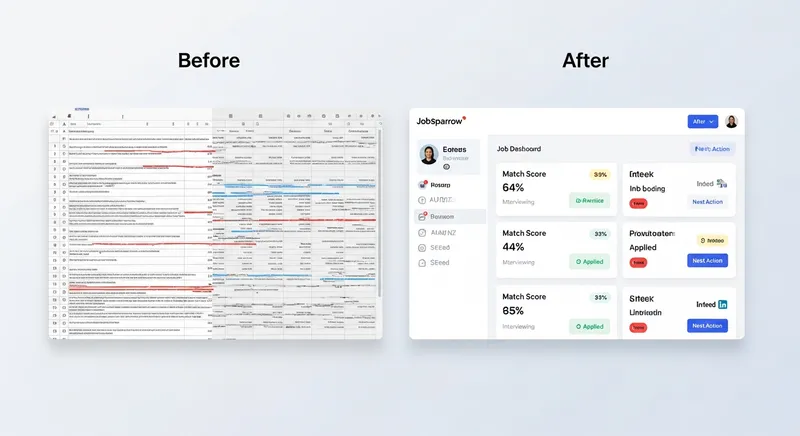
A spreadsheet requires constant, tedious manual entry. It's a passive list of data, completely disconnected from your resumes, cover letters, and the job posts themselves. It is, fundamentally, an obsolete tool for a modern, dynamic problem.
The Solution: Your Job Application Tracker as a Smart Command Center
Instead of a scattered spreadsheet, imagine a single, intelligent command center. This is the modern alternative: a job application tracker that doesn't just store information but actively helps you manage your search. JobSparrow's Smart Job Search and Job Application Tracking tools are built on this principle.
A smart command center transforms your job search through three core steps, turning chaos into a clear, manageable workflow.
Step 1: Aggregate Listings from SEEK, LinkedIn & More
Your first move is to bring all potential opportunities into one place. Instead of bookmarking jobs or pasting links into a spreadsheet, a smart tracker uses a browser extension to save jobs from any site-including SEEK, LinkedIn, and Indeed-with a single click.
This instantly solves the problem of vanishing job descriptions. The system saves the entire job post, including the company details, responsibilities, and qualifications, linking it permanently to your application record. You can refer back to it at any time, especially when preparing for an interview.
Actionable Tip: Install a tracker's browser extension and make it a habit to save any interesting job the moment you see it. This takes two seconds and builds your pipeline of opportunities automatically.
Step 2: Track Applications with an AI-Powered 'Match Score'
Once a job is saved, the next step is to move beyond simple status tracking. A truly smart tracker analyzes the job description against your resume to generate a 'Match Score.' For example, a 78% Match Score means you have most of the key skills, but you might be missing 'Google Analytics' and 'SEO experience'-giving you a clear roadmap for tailoring your application.
This is a game-changer. Instead of guessing your chances, you get a data-driven indicator of your compatibility. It allows you to prioritize your time and effort, focusing on the roles where you are a strong contender. As data from the LinkedIn Talent Blog shows, a focus on skills is crucial for quality hires, and a Match Score helps you pinpoint that alignment.
Actionable Tip: After saving a job, check its Match Score. If the score is below 70%, use JobSparrow's built-in Gap Analysis to see exactly which keywords and skills are missing from your resume. Then, update your resume to better reflect the job's needs. For an even deeper analysis, you can get a Free Resume & CV Review in Australia: Get Expert Feedback & Beat the ATS to ensure your documents are optimized.
Don't guess your fit. Check your Match Score for free and see where you stand in under 60 seconds.
Step 3: Keep All Tailored Documents in One Place
One of the biggest anxieties for job seekers is not knowing which resume or cover letter they sent. A smart command center eliminates this fear by linking your tailored documents directly to the application entry.
This is all powered by your Master Career Profile-a comprehensive record of your skills and experience that acts as the single source of truth for every tailored application. When you use a tool like JobSparrow to tailor your resume for a specific role, the generated document is automatically saved with that application. When you get an interview request, you can open your tracker and see the exact resume, cover letter, and job description the hiring manager is looking at. This gives you immense confidence and allows for much more precise interview preparation.
Actionable Tip: When you tailor a resume, use a system that automatically saves and links it for you. This ensures every application has its unique, tailored documents attached. This is especially vital for those navigating a career change, where highlighting transferable skills is key. Learn more in this Career Change Australia: Your Guide to Highlighting Transferable Skills.
Special Focus: A Job Search Strategy for Migrants in New Zealand & Australia
For job seekers migrating to Australia or New Zealand, the organizational challenge is even greater. You're not just tracking jobs; you're tracking visa compatibility, employer sponsorship status, and work rights for each specific role. A generic spreadsheet is simply not equipped for this level of detail.
A smart job tracker allows you to add custom fields to manage this critical information. For official guidance, always refer to government sources like Immigration New Zealand for visa requirements.
Actionable Tip: In your job tracker, add the following custom fields for every application:
- Visa Requirement: (e.g., AEWV, Skilled Migrant Category)
- Offers Sponsorship: (Yes/No/Unsure)
- Work Rights Verified: (Yes/No)
This ensures you're only investing time in viable opportunities. To further prepare, review our guide on NZ Interview Questions & Answers: A Guide to Kiwi Workplace Culture.
From Application Chaos to Offer Confidence
An organized, strategic job search often leads to a fantastic outcome: managing multiple job offers. When you use a smart tracker, this moment feels less like a scramble and more like a calculated decision. And to help you get to the offer stage, tools like JobSparrow's AI Mock Interview feature let you practice with role-specific questions, building the confidence to ace the interview.
When you receive an offer, you can review all your notes, the original job description, and your communication history. To compare offers, experts at publications like Harvard Business Review advise looking beyond salary to consider long-term fulfillment and company culture. Leading recruitment firms like Robert Half also confirm that it's standard practice to take time to consider an offer, giving you space to weigh your options without pressure.
Actionable Tip: Create a 'Decision Matrix' in your tracker's notes for each offer. List your top priorities (e.g., Salary, Work-Life Balance, Career Growth, Commute, Team Culture) and score each offer from 1-5. This provides a logical framework to make the best possible choice. If salary is a key factor, make sure you're prepared with our guide on How to Answer 'What Are Your Salary Expectations?' (AU & NZ Guide).
Your Next Step: Make JobSparrow Your Command Center
Stop letting your dream job slip through the cracks of a messy spreadsheet. What used to take hours of manual tracking and tailoring for each application can now be done in minutes. By adopting a smart command center, you can replace chaos with clarity, save dozens of hours, and apply with data-driven confidence.
The JobSparrow application tracker is designed to be this central hub, integrating your job search, document tailoring, and application management into one seamless workflow.
Ready to transform your job search? Start with a free diagnosis and see where you stand today. Experience the power of an organized, intelligent job search.
Frequently Asked Questions
What is the best way to keep track of job applications?
The most effective way is to use a dedicated job application tracker app that automates the process. While a spreadsheet is a basic first step, a smart tracker like JobSparrow goes much further. It automatically saves job descriptions, links your tailored resumes and cover letters to each specific role, and provides data-driven insights like a 'Match Score' to guide your efforts. This turns your job search from a passive data-entry task into an active, strategic campaign.
Is a spreadsheet good for tracking job applications?
A spreadsheet is better than nothing, but it is not a good tool for a serious, modern job search. Its main drawbacks are that it is entirely manual, making it time-consuming and highly prone to error. Crucially, it's disconnected from your application documents and the job postings themselves. As you apply for more roles, the spreadsheet quickly becomes another source of chaos, which is why integrated digital tools are a superior alternative.
How do I track my applications on SEEK and LinkedIn?
Both SEEK and LinkedIn offer internal features to save or track jobs, but they exist in separate silos. They cannot communicate with each other, meaning you still have to check multiple platforms to see the full picture. The best solution is a centralized job tracker with a browser extension. This allows you to save any job from SEEK, LinkedIn, Indeed, or a company's own career page into a single, unified dashboard, giving you one source of truth.
How do you organize multiple job applications?
To effectively organize multiple applications, you need a central 'command center' for your search. For every single role you are interested in, you should track:
- The company name and job title
- The application status (e.g., Saved, Applied, Interviewing, Offer)
- The date you applied
- The specific version of the resume and cover letter you used
- A permanently saved copy of the job description
- Key contacts and their details
- Notes from interviews and important follow-up dates
What is an application tracking system for job seekers?
An application tracking system for job seekers, often called a 'job tracker,' is a personal software tool designed to help you, the candidate, manage your side of the job search process. It is your private equivalent of the Applicant Tracking Systems (ATS) that companies use to manage their hiring pipeline. Its purpose is to help you stay organized, tailor your applications to beat the company's ATS, and confidently manage all communications with potential employers from application to offer.
Tags
Keep reading
Recommended articles.
ghost jobs · job scams
Ghost Jobs vs. Job Scams: How to Spot Fake Listings on SEEK and Indeed (2026 Guide)
Spot ghost jobs and employment scams on SEEK and Indeed. Protect your data, learn to spot red flags, and land real interviews with JobSparrow's guide.
seek · job search
Stand Out on SEEK in 2026: A Guide to Beat the Algorithm
Beat the SEEK algorithm in AU & NZ. Our guide helps you rank higher in recruiter searches, optimize your profile, and land more interviews. Get noticed.
job search · resume tips
Job Application Black Hole AU/NZ: 8 Reasons You're Not Hearing Back & How to Fix It
Getting ghosted by jobs in AU/NZ? We reveal 8 reasons your application is ignored and a framework to get seen. Get your free resume match score now.