
ats
Beat the Bots: An AU/NZ Guide to ATS-Friendly Resumes with Keyword and Formatting Secrets
By Job Sparrow Team

Beat the Bots: An AU/NZ Guide to ATS-Friendly Resumes with Keyword and Formatting Secrets
You've spent hours perfecting your resume. You've found the ideal job, submitted your application, and waited. And then… nothing. The silence is crushing. You start questioning everything-your experience, your qualifications, even your worth. But the problem often isn't you; it's that your resume never reached a human.
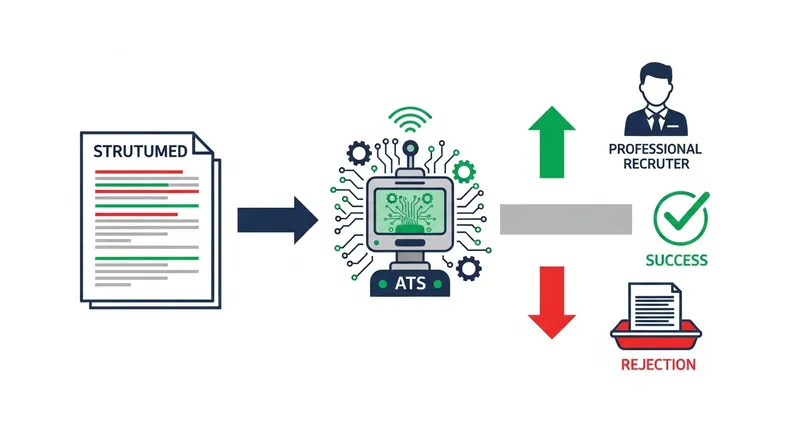
Welcome to the world of the Applicant Tracking System (ATS). With up to 75% of resumes being rejected by these systems before a person ever sees them, this software is the digital gatekeeper for a vast majority of companies in Australia and New Zealand. It scans, filters, and ranks your resume based on a rigid set of rules. If your document isn't formatted correctly or lacks the right keywords, it gets automatically discarded.
But you can beat the bots. This guide provides a technical, actionable deep-dive specifically for the AU/NZ job markets. We will move beyond generic advice and give you the exact formatting and keyword secrets to create an ATS-compliant resume that gets you noticed. It's time to ensure your qualifications get the attention they deserve. And if you're struggling to keep tabs on every application, a good job application tracker can help you manage your search across SEEK, Indeed, and LinkedIn.
What is an Applicant Tracking System (ATS) and How Does it Rank Resumes in AU/NZ?
An Applicant Tracking System (ATS) is essentially a digital filing cabinet that helps recruiters manage high volumes of job applications. Instead of manually sifting through hundreds of resumes, they use this software to automate the initial screening process.
Its primary function is to scan your resume, parse the information into a digital profile, and rank your application based on how well it matches the job description. According to The University of Sydney's careers service, a software program often performs the first cull of applications by scanning for specific keywords. This ranking process isn't magic; it's a matching game. The system looks for direct matches between the skills, job titles, and qualifications listed in the job ad and the content of your resume.
In Australia and New Zealand, many large companies use well-known ATS platforms like Taleo (by Oracle), PageUp People, and Workday. While each has its own quirks, they all operate on the same basic principle: they need cleanly formatted, keyword-relevant data to work effectively.
The Unforgiving Rules: How to Format Your Resume for Any ATS
Understanding how an ATS works is the first step. Now, let's get technical about exactly how to format your resume so the software can actually read it. An ATS is powerful, but it's not smart like a human. Fancy designs that look great to the eye can completely confuse the software. To ensure your resume is parsed correctly, follow these unforgiving rules.
Based on technical guidance from sources like the University of Illinois Chicago Career Services, here is your formatting checklist:
- File Format: Always choose .docx over PDF when possible. While many modern ATS can handle PDFs, some older systems can't read them correctly or will jumble the text. A .docx file is the safest bet for maximum compatibility.
- No Columns or Tables: This is the most common mistake. An ATS reads from left to right, top to bottom. When it encounters columns, it reads straight across, turning your carefully formatted sections into a nonsensical string of text. Stick to a single-column layout.
ATS Parsing Example: Why Columns Fail A two-column resume might look like this to you: Skills
- Financial Modelling
- Stakeholder Engagement
Experience Senior Analyst But an ATS reads it like this:
Skills Experience Senior Analyst Financial Modelling Stakeholder EngagementResult: Your experience is unreadable.
- Use Standard Fonts: Don't get creative. Stick to universal, ATS-safe fonts like Arial, Calibri, Georgia, or Times New Roman. Use a font size between 10 and 12 points.
- Avoid Headers and Footers: Information in the header or footer (like your name and contact details) can be completely ignored by some ATS. Put all essential information in the main body of the document.
- Simple Bullet Points: Use standard, solid-circle or square bullet points. Complex symbols or custom icons may not render correctly.
- No Graphics, Logos, or Photos: In Australia and New Zealand, photos on resumes are not standard practice. Graphics, logos, and images are invisible to an ATS and can cause parsing errors.
- Use Standard Section Headings: Don't use clever titles like "Where I've Been." Stick to universally recognized headings like "Professional Experience," "Work History," "Education," and "Skills."
- AU/NZ Job Board Tip (SEEK): As the dominant job board, SEEK acts as a gateway to thousands of company ATS platforms. According to SEEK's own career advice, applying all the universal ATS-friendly rules above is the best strategy. Additionally, take the time to fill out your SEEK profile completely, as this data is also used for matching you with recruiters searching the platform directly.
The Keyword Code: How to Find and Use the Right Keywords
If formatting is the foundation, keywords are the currency of the ATS. The system ranks your suitability by counting how many times your resume mentions the key skills and qualifications listed in the job description. Your goal is to mirror the language of the employer.
Here's a step-by-step method to find and use the right keywords:
- Analyse the Job Description: Copy the entire job description. Go through and highlight the key requirements. Look for hard skills (like "financial modelling," "Salesforce," or "Python"), soft skills ("stakeholder engagement," "team leadership"), and specific qualifications ("CPA certified," "Bachelor of Commerce").
- Use the Exact Phrasing: An ATS is literal. If the job ad asks for "Project Management Professional (PMP)," you should use that exact phrase, not just "PMP" or "managed projects." As leading recruitment firm Hays Australia advises, tailoring your resume for each specific role is crucial.
- Integrate Keywords Naturally: Don't just list keywords in a block. Weave them into your professional summary and experience bullet points. This makes the text compelling for both the bot and the human who reads it next.
Keyword Example: Before & After Job Description Keyword: "stakeholder engagement"
- Before: Spoke with different departments to gather requirements.
- After (ATS-Optimised): Drove project success through proactive stakeholder engagement across three key departments to define and align on project requirements.
- Include Both Acronyms and Full Text: Don't assume the ATS knows that "CPA" means "Certified Practising Accountant." To be safe, include both the full term and the acronym on first use, for example, "Certified Practising Accountant (CPA)."
Manually tailoring your resume for every application is time-consuming. This is where AI can be a powerful assistant. JobSparrow's Job-Specific Resume Tailoring feature automates this process. You provide the job description, and our AI instantly analyzes it for key requirements. It then intelligently selects the most relevant experience from your Master Career Profile and rewrites your bullet points to match the job's keywords, ensuring you beat the bots every time. You can get started with a free resume and CV review to see how you stack up.
Tailored Tactics for AU/NZ Job Seekers
Beyond general ATS rules, certain groups face unique challenges. Here is specific advice for migrants and career changers in the Australian and New Zealand job markets.
For Migrant Professionals: Translating Your Experience
Translating your valuable overseas experience into a format that local employers and their systems understand is a major hurdle. As Australian broadcaster SBS notes, a resume format that is standard in your home country may not be appropriate for the local market.
- Localise Job Titles: A 'Solicitor' in the UK or Australia is an 'Attorney' in the US. Research the equivalent local job titles and use them on your resume.
- Clarify Visa Status Simply: If you have the right to work, state it clearly and simply in your contact section, for example: "Full working rights in Australia." The ATS can then flag this for recruiters.
- Use AU/NZ Spelling: Ensure your document uses local spelling, such as 'organise' (not 'organize') and 'analyse' (not 'analyze'). This is a small but important signal.
- Bridge the Gap: Use your professional summary to explicitly connect your international experience to the local role. For example: "A UK-qualified marketing manager with 8 years of experience, now seeking to apply expertise in digital campaigns within the Australian FMCG sector."
For Career Changers: Highlighting Transferable Skills
When you're changing careers, an ATS can easily dismiss your past experience as irrelevant. Your task is to show the system that your skills, not your job titles, are a perfect match. A dedicated guide on writing a career change resume can provide even more detail.
- Lead with a Skills Section: Place a 'Key Skills' or 'Core Competencies' section directly under your professional summary. This allows the ATS to immediately see relevant keywords before it even gets to your work history.
- Reframe Your Experience: Don't just list past duties. Translate them into the language of your new industry, focusing on outcomes and skills.
- Example 1 (Retail to Office): A retail manager moving into a team lead role.
- Old Description: "Managed daily operations of a busy retail store."
- ATS-Optimised Description: "Led and mentored a team of 10+ staff, driving performance to exceed sales targets by 15% quarter-over-quarter through strategic planning and stakeholder engagement."
- Example 2 (Teacher to Corporate): A teacher moving into a corporate trainer role.
- Old Description: "Taught a class of 30 students and prepared lesson plans."
- ATS-Optimised Description: "Designed and delivered comprehensive training programs for diverse audiences, developing engaging curriculum and materials to improve learning outcomes and knowledge retention."
JobSparrow's Gap Filler tool can be invaluable here. The AI coach interactively reviews your career history and asks targeted questions to help you identify and articulate the transferable skills you might have overlooked.
Don't Forget the Cover Letter: Does ATS Scan It Too?
The short answer is yes. Many ATS platforms can and do scan cover letters for keywords, just like they scan your resume. This is another critical opportunity to align your application with the job description.
Treat your cover letter with the same keyword discipline. Keep the formatting simple and ensure you naturally weave in key terms from the job ad. While its ultimate audience is the hiring manager, it often has to pass the robot gatekeeper first. If you're applying for an internal role, the same rules apply, and you can find more tips in this guide to internal promotion cover letters.
Writing a unique, keyword-optimised cover letter for every application is a major source of job search fatigue. JobSparrow's Intelligent Cover Letter Generator creates a personalized letter for the specific role and company, pulling from your experiences to craft a compelling narrative that satisfies both the ATS and the recruiter.
Conclusion: From ATS Rejection to Interview Invitation
Getting past the bots isn't about luck; it's about strategy. By combining a clean, simple format with keywords carefully tailored to the job description, you dramatically increase your chances of landing in the 'yes' pile.
Remember the formula: Simple Formatting + Tailored Keywords = Success. You have the experience and the skills. You've worked too hard to let a machine stand between you and your dream role. Now you have the technical knowledge to make sure your story gets heard, turning that frustrating silence into an invitation for an interview. Once you get there, be prepared with these real interview questions asked in Australia and NZ.
Ready to stop guessing and start getting interviews? Tailor your first AU/NZ resume in under 2 minutes with JobSparrow and see the difference.
Frequently Asked Questions
Should I use a two-column resume in Australia?
No. While they can be visually appealing, two-column resumes often confuse ATS parsers. The software reads a document from left to right, line by line. When it encounters two columns, it reads straight across the page, mashing the text from both columns together into a nonsensical string of words. To ensure the system can read your experience correctly, always stick to a single-column format.
Is it okay to use a resume I made on Canva?
It is very risky. Resumes created in graphic design tools like Canva are often exported as image-based PDFs, which most Applicant Tracking Systems cannot read. The text may not be selectable, meaning the ATS effectively sees a blank page and will discard your application. It is always safer to create your resume in a text editor like Microsoft Word or Google Docs and save it as a .docx file.
How long should my resume be for the NZ market?
For the New Zealand market, a resume (or CV, as it's more commonly called) is typically two to three pages long. This is different from the strict one-page standard often seen in the United States and allows for more detail on your experience, projects, and skills. This length is standard and expected by most New Zealand employers.
Do I need to include a photo on my Australian resume?
No, you should not include a photo on your resume in Australia or New Zealand. It is not standard practice and is actively discouraged as it can introduce unconscious bias into the hiring process. Furthermore, most Applicant Tracking Systems are not configured to process images, and including one can cause file errors that lead to your application being rejected.
How can I check if my resume is ATS-friendly?
A simple way to test your resume is to save it as a Plain Text (.txt) file and then open it. If the text is out of order, jumbled, or filled with strange characters, an ATS will struggle to read it. For a more detailed analysis, you can use an ATS resume checker or get a free expert review to identify specific formatting and keyword issues that could be holding you back.
Tags
Keep reading
Recommended articles.
resume writing · career change
Transferable Skills for Career Change Resume (AU/NZ Guide)
Master your career change with Job Sparrow. Use AI to identify and showcase transferable skills on your CV. Beat the ATS in Australia & NZ. Start for free!
job search · resume tips
Job Application Black Hole AU/NZ: 8 Reasons You're Not Hearing Back & How to Fix It
Getting ghosted by jobs in AU/NZ? We reveal 8 reasons your application is ignored and a framework to get seen. Get your free resume match score now.
ai tools · job search
AI Resume & Cover Letter Generator for AU & NZ (2026)
Create a perfectly matched, ATS-optimized resume & cover letter for AU & NZ jobs. Our AI ensures consistency to help you land interviews. Pay only when you get an offer.