
video interview
Master One-Way Video Interviews: An Insider's Guide for AU & NZ (2026)
By Job Sparrow Team
Introduction: Why One-Way Video Interviews Are Your New First Impression
You get the email: "Invitation to complete a one-way video interview." Your heart sinks. You have to record yourself answering questions for an unseen, unknown audience, with no human feedback, no smile to build rapport with, and no chance to ask for clarification. It can feel awkward, impersonal, and incredibly high-stakes.
If this sounds familiar, you're not alone. This is the new reality of the job hunt. Far from a temporary pandemic measure, virtual interviews are here to stay. According to the Society for Human Resource Management (SHRM), a staggering 93% of employers plan to continue using them long-term. This asynchronous video interview guide is designed to turn that anxiety into confidence, giving you a step-by-step plan to master the format and make a powerful first impression in the Australian and New Zealand job markets.
What is a One-Way Video Interview (and Why Do AU/NZ Companies Use Them)?
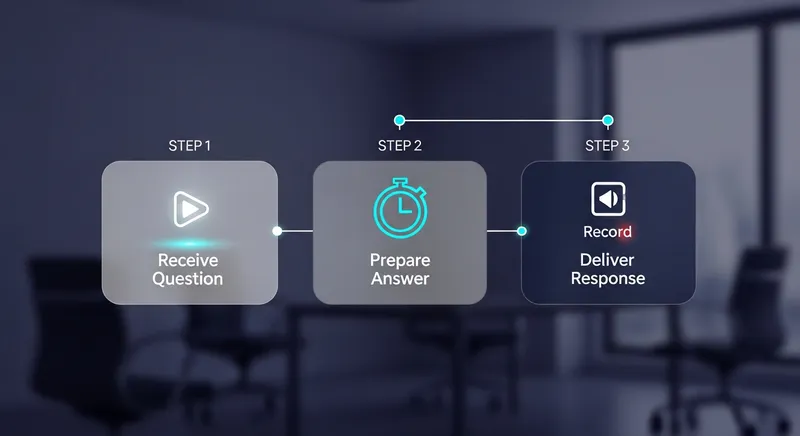
A one-way video interview is a pre-recorded screening process where you record your answers to a set of questions without a live interviewer present. You'll typically receive a link, be given a certain amount of time to prepare for each question (often just 30-60 seconds), and then a limited time to record your answer.
Companies across Australia and New Zealand, from large corporations to government bodies, use these tools to manage a high volume of applicants efficiently. You'll frequently encounter platforms like HireVue, Spark Hire, Vieple, and Talview, especially when applying for competitive graduate programs or large-scale recruitment drives. For instance, Services Australia confirms its use of one-way video interviews in its application process, highlighting just how mainstream this practice has become.
For employers, it's about standardizing the initial screening and saving time. For you, it's your first real chance to stand out from your CV, making it a critical stage to master, just like a Panel Interview AU & NZ (2026): 15+ Questions & Answers to Succeed.
Demystifying the 'Bot': What AI Is Actually Analysing
Let's address the biggest fear: being judged by a heartless robot. It's a valid concern, especially with growing awareness of algorithmic bias. Research from the University of Melbourne highlights that recruitment AI can indeed carry risks of discrimination. In 2024, 62% of Australian organisations were already using AI in hiring.
However, it's crucial to understand that in most current systems, the AI is a tool, not the final judge. The 'bot' is primarily performing tasks like:
- Speech-to-Text Transcription: Converting your spoken words into text for the human recruiter to read later.
- Keyword Analysis: Checking if your answers contain keywords and competencies mentioned in the job description.
- Delivery Metrics: Analysing your pace of speech, use of filler words (like 'um' or 'ah'), and vocal tone.
While this technology is powerful, it's not sentient. It doesn't understand your personality or your unique life experience. The final decision almost always rests with a human recruiter who reviews the recordings or transcripts. Your goal isn't to 'trick' the AI, but to provide clear, well-structured content that makes it easy for the human reviewer to see your value. This human-AI collaboration is a key part of the modern tech interview, and you can learn more in our guide on Acing the 2026 AU/NZ Tech Interview with Human-AI Collaboration.
Phase 1: Pre-Interview Setup for Success
Before you even think about what you're going to say, you need to control your environment. A flawless technical setup shows professionalism and ensures that nothing distracts from your performance. This is about controlling the controllables.
Your Tech and Environment Checklist
Go through this checklist the day before and again one hour before you start your interview. As experts advise, solid preparation is key to acing any virtual interview.
- Lighting: Position yourself facing a source of natural light, like a window. If that's not possible, place a lamp or ring light in front of you. Never have the main light source behind you, as you'll become a silhouette.
- Background: Your background should be clean, tidy, and professional. A neutral wall, a bookshelf, or a simple plant is perfect. Avoid virtual backgrounds if possible, as they can be glitchy and distracting.
- Audio: Use headphones with a built-in microphone. This simple step dramatically reduces echo, eliminates background noise, and ensures your voice is crystal clear.
- Camera: Position your laptop or webcam at eye level. You can use a stack of books for this. Looking slightly down at a camera is unflattering, while looking up can feel unnatural. And don't forget to wipe the lens!
- Internet: Test your internet connection. Close all other applications and browser tabs to ensure you have maximum bandwidth. Inform anyone else in your household that you need a quiet environment and stable internet for the next hour.
What to Wear for a Video Interview in AU & NZ
Your attire sets a professional tone for you and the reviewer. The golden rule is to dress one level above what you'd wear to the office for that role.
- Colour: Solid colours like blue, grey, or green work best on camera. Avoid busy patterns, bright whites (which can wash you out), and blacks (which can lose detail).
- Fit: Wear something that is comfortable but well-fitting. Research the company culture- what's appropriate for a Sydney tech startup will differ from a Wellington government agency.
- Full Outfit: Dress professionally from head to toe. Even though they'll only see your top half, dressing the part completely helps you get into a professional, confident mindset.
Ready to test your setup? Don't wait until the real interview to discover a technical glitch. Try JobSparrow's AI Mock Interview to get instant feedback on your lighting, audio, and on-camera presence.
Phase 2: Crafting Powerful, High-Scoring Answers
With your setup perfected, it's time to focus on the most important element: the content of your answers. This is where you prove your value and connect your experience to the role.
Master the STAR Method for Time-Crunched Video Answers
The STAR method is the gold standard for answering behavioural interview questions, and it's even more critical in a pre-recorded format where you can't ask for clarification. As recommended by career services, it provides a clear structure to showcase your skills.
- S - Situation: Briefly describe the context. (1-2 sentences)
- T - Task: Explain what you were responsible for. (1 sentence)
- A - Action: Detail the specific steps you took. This should be the longest part of your answer.
- R - Result: Quantify the positive outcome. What was the impact of your actions?
For a time-crunched video answer, aim for a 20/60/20 split: spend about 20% of your time on Situation and Task, 60% on your Actions, and 20% on the all-important Result. A powerful result is the key to a great Resume Summary in Australia & NZ.
Example: "Describe a time you had to handle a difficult customer."
- Generic Answer: "I once had an angry customer, so I listened to them, found a solution, and they were happy in the end."
- STAR Answer:
- (S) "In my role at XYZ Retail, a customer's online order for a major event was delayed and they were understandably very upset."
- (T) "My task was to de-escalate the situation and find an immediate solution to ensure they had their product in time for their event."
- (A) "I actively listened to their concerns without interrupting, empathized with their frustration, and confirmed I understood the urgency. I then took ownership, personally located the same item at a nearby store, and arranged for a complimentary express courier to deliver it within two hours. I also processed a full refund for the original shipping fee as a gesture of goodwill."
- (R) "As a result, the customer received their item in time, and they were so impressed with the service that they left a 5-star review mentioning me by name, which was later highlighted in our team meeting. It turned a negative experience into a moment of customer loyalty."
Pro Tip: Build Your Story Bank Don't try to invent STAR stories on the spot. JobSparrow's AI can help you identify your strongest career achievements and craft 3-4 powerful stories you can adapt for any question. Build your story bank once, and use it everywhere.
Most Common HireVue Questions and How to Answer Them
While questions can vary, you can prepare for the most common ones. Have 3-4 strong career stories ready that you can adapt using the STAR method.
- "Tell me about yourself." This isn't an invitation to share your life story. Use this formula: Present (who you are now professionally), Past (a brief highlight of relevant experience), and Future (why you're excited about this specific role).
- "Why do you want to work here?" Show you've done your research. Talk about the company's values, a specific project they worked on, or how their mission aligns with your own career goals. Don't just say you need a job.
- "Describe a time you faced a challenge." This is a classic behavioural question. Use a STAR story that highlights your problem-solving skills, resilience, and ability to learn from setbacks.
- "What are your strengths and weaknesses?" For strengths, pick one that is relevant to the job and back it up with a mini-STAR story. For weakness, be honest but not detrimental. Choose a real weakness you're actively working on improving.
Phase 3: Delivering a Confident On-Camera Performance
With your content prepared, the final piece of the puzzle is your on-camera delivery. Without a live interviewer, your non-verbal cues are everything.
- Eye Contact: This is the most important tip. Look directly into the camera lens, not at your own face on the screen. To help, put a small sticky note with a smiley face right next to your webcam as a reminder. This simulates direct eye contact with the recruiter watching later.
- Body Language: Sit up straight, shoulders back, and lean in slightly to convey engagement. Use natural hand gestures as you would in a normal conversation, but keep them within the frame.
- Vocal Tone and Energy: Smile before you hit record. It instantly makes your voice sound warmer and more engaging. Speak clearly, at a measured pace, and vary your tone to avoid sounding robotic. Enthusiasm is contagious, even through a screen.
Tailored Advice for the AU & NZ Job Market
Success in a video interview also means understanding the nuances of the local market and your specific situation.
- For Migrants: A major concern for many new arrivals is their accent. Some AI tools can penalize non-native speakers. Instead of worrying about your accent, focus on clarity and pace. Speak slightly slower than you normally would and enunciate clearly. Frame your international experience as a global perspective that brings unique value. As noted by Immigration Chambers New Zealand, employers often look for local experience, so use the interview to show you understand the local context and are eager to apply your global skills here. A skills assessment can also be a crucial step in this journey, and our Guide to VETASSESS, TRA & ACS can help.
- For Career Changers: Your mission is to connect the dots for the recruiter. Explicitly use your STAR answers to highlight transferable skills. For example, if you're moving from hospitality to project coordination, talk about how you managed a complex event (the project) for multiple stakeholders (the clients, staff, and vendors).
- For Graduates: One-way video interviews are a staple in graduate recruitment for major banks, consulting firms, and large corporations in Australia and New Zealand. Recruiters are looking for potential, enthusiasm, and a strong cultural fit. Research the company's values and make sure your answers reflect them. Show that you're eager to learn and grow with the organization.
The Key to Confidence: Practice with AI Feedback
Ultimately, the single most effective way to reduce anxiety and improve your performance is to practice. But how do you practice for an interview where you can't get feedback?
This is where technology becomes your ally. Using an AI-powered tool for pre-recorded video interview practice gives you a safe space to rehearse your answers and receive objective feedback. This is precisely why we built the AI Mock Interview feature into JobSparrow. Our tool simulates the real experience, allowing you to record yourself answering role-specific questions. Afterwards, the AI provides instant feedback on:
- Your answer's relevance and structure (including STAR method completeness).
- Your pace of speech and use of filler words.
- Your overall delivery, tone, and on-camera energy.
This allows you to refine your STAR stories, perfect your timing, and get comfortable talking to a camera- all before the real interview. You can build the confidence you need to shine when it counts.
Conclusion: You're Ready to Press Record
Acing a one-way video interview isn't about being a perfect actor or tricking an algorithm. It's about preparation, structure, and confident delivery. By controlling your environment, crafting powerful STAR-based answers, and practicing your performance, you can turn this daunting task into a genuine opportunity to showcase your skills and personality.
You have the tools and the strategy. Now, take a deep breath, smile at the camera, and show them what you've got. You're ready to press record.
Practice your next one-way video interview with AI feedback in under 10 minutes. JobSparrow analyzes your answers, delivery, and timing- then shows you exactly how to improve. Start your free trial and ace your next interview.
Frequently Asked Questions
Can you re-record your answers in a one-way video interview?
This depends entirely on the platform and the employer's specific settings. Some platforms may allow for one re-record attempt per question, but many are strictly one-take only. The safest and most professional approach is to assume you only have one chance. Always take advantage of the practice questions offered by the platform to get comfortable with the interface, your timing, and your camera presence before you begin the scored questions.
How long should my answers be?
Your goal is to use the allotted time effectively. If you're given two minutes to answer, a brief 30-second response can appear unprepared or lacking in substance. Conversely, you don't want to be cut off mid-sentence. A good rule of thumb is to aim to finish your answer with about 5-10 seconds to spare. This shows that you can be both thorough and concise. Practicing with a timer is the best way to master your pacing. Pro Tip: Practice your timing with JobSparrow's AI Mock Interview.
Are one-way video interviews fair, especially for non-native English speakers?
This is a significant and valid concern, and research has highlighted the potential for AI systems to carry biases. However, you can take control by focusing on factors that improve clarity for both AI transcription and human reviewers. Concentrate on speaking clearly and at a measured pace, rather than worrying about modifying your accent. The power of the STAR method is that it provides a logical, universally understood structure for your answers. A well-structured story that demonstrates your skills and quantifiable achievements is compelling in any accent.
What is the single biggest mistake to avoid in a video interview?
The single biggest mistake is a lack of preparation. This manifests in several ways: not researching the company and role, not preparing STAR-based stories for common behavioural questions, not testing your technology beforehand, and trying to 'wing it'. A close second is reading your answers from a script taped to your screen. Recruiters can always tell, as your eyes will be moving and your delivery will sound unnatural. Your goal is to be prepared, not scripted.
How do I show enthusiasm when I'm just talking to a camera?
Projecting energy and enthusiasm into a void is challenging, but it's crucial for making a good impression. Be intentional with your non-verbal cues. Smile genuinely as you begin and end your answer. Use vocal variety, avoiding a flat, monotone delivery. Sit up straight, lean slightly towards the camera to show engagement, and use natural hand gestures. Most importantly, look directly into the camera lens to create a sense of connection with the person who will eventually watch your recording. Pro Tip: Want to see how you come across on camera? Get instant feedback on your energy and delivery with a free practice session.
Tags
Keep reading
Recommended articles.
job search · resume tips
Job Application Black Hole AU/NZ: 8 Reasons You're Not Hearing Back & How to Fix It
Getting ghosted by jobs in AU/NZ? We reveal 8 reasons your application is ignored and a framework to get seen. Get your free resume match score now.
redundancy · job search
Made Redundant? Your 90-Day Action Plan for a Better Job in AU/NZ
Made redundant in AU/NZ? This 90-day action plan helps you land a better job faster. From mental health to AI-powered applications, regain control today.
job search · automation
The Anti-Burnout Job Search: An AU/NZ Guide to Automating Your Applications in 2026
Beat job search burnout in AU/NZ. Automate applications, tailor resumes with AI, and manage your search in one place. Start free.