
ats resume formatting
Why Your MS Word Resume Builder Fails the ATS (And How to Fix It)
By Job Sparrow Team
You open Microsoft Word, pick one of the sleek, pre-installed ATS-friendly Word resume templates, and spend four hours perfecting every bullet point. Then you upload that file into a corporate job portal and watch your entire work history scramble into gibberish. Worse, you apply to 30 roles and hear nothing back because your contact details and job dates vanished during automated screening.
If you have ever been forced to manually re-type your entire resume (or CV, as it is known in the UK, Australia, and New Zealand) into Workday right after uploading it, you have experienced a parsing failure firsthand. Our team and advisors have collectively reviewed 100,000+ resumes and bring 10+ years of hands-on recruiting and hiring experience across four markets (Australia/NZ, the United States, Singapore, and Hong Kong). Sitting on both sides of the hiring table, we have seen this formatting trap undermine strong applications.
The core problem is not your career history. The problem is that Microsoft Word's template gallery and built-in builders rely on invisible layout tables, floating text boxes, and document header layers that blind Applicant Tracking Systems (ATS). In this guide, you will learn why Word builders fail, how to strip hidden formatting out of your current .docx file step by step, and how to run a free ATS resume parser test before you hit submit.
Want to see how your current file reads right now? Start with a free diagnosis to get your recruiter-lens score out of 100 and see the exact gaps costing you interviews.
What is an Applicant Tracking System (ATS) and how does it read your file?
An Applicant Tracking System (ATS) is recruitment software that collects, sorts, and ranks job applications before a hiring manager reviews them. When you upload a resume, the software does not look at your document the way a human eye looks at a printed page. Instead, it runs an automated extraction program called a parser.
The parser strips away colors, borders, and styling to convert your document into raw XML or plain text. It then attempts to map that raw text into standardized database fields: Name, Phone, Email, Work Experience, Job Titles, Dates of Employment, Education, and Skills.
According to research from Harvard Business School and Accenture, more than 90% of employers surveyed use automated recruiting systems to initially filter or rank candidates, and 88% agreed that qualified high-skills candidates are vetted out because they do not match the exact criteria in the job description.
If the parser cannot read the underlying structure of your Word file, two things happen:
- Broken database fields: Your job titles get merged with your company names, or your employment dates disappear, making it look like you have zero years of experience.
- Failed keyword scoring: Skills trapped inside unrecognized shapes or sidebars are skipped entirely, dropping your match score below the recruiter's shortlist threshold.
Understanding the difference between passing a software parser and impressing a human hiring manager is critical. For a deeper look at how human screeners evaluate your document once it clears the software hurdle, read our breakdown of ATS Friendly Resume Builder vs. Recruiter Reality: How to Pass Both Filters.
Why Microsoft Word resume templates and builders fail ATS scans
Job seekers naturally trust Microsoft Word because .docx is a universally accepted file extension. However, the templates featured inside Word's startup screen are created by graphic designers for visual print layout, not by HR technologists for database extraction.
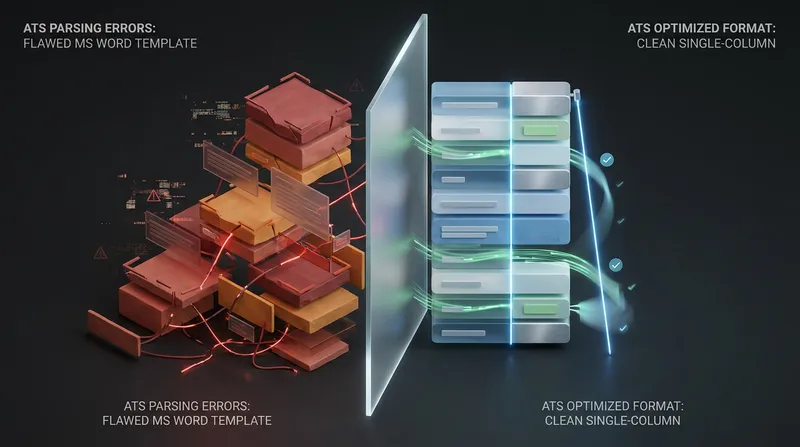
Pre-built templates are frequently constructed from a complex web of fields, borderless tables, and hidden document containers that confuse ATS software and prevent parsers from cleanly extracting your career history.
The invisible table trap: does ATS read tables in Word?
A common question we hear from candidates is whether an ATS reads tables in Word. While modern parsers can occasionally extract text from simple tables, borderless layout tables remain the single biggest cause of scrambled resumes.
Graphic designers use invisible two-column tables in Word to keep dates aligned on the left and job descriptions aligned on the right. Legacy parsers read tables left-to-right across the entire row before moving down to the next line. Instead of reading your narrow left column and then your wide right column, the parser splices them together line by line.
The under-the-hood X-ray: what you see vs. what the ATS extracts
Here is what happens when you upload a two-column or table-based MS Word template into an older parser:
- What you see on your screen:
- Left column:
Skills: Python, SQL, Project Management - Right column:
Senior Data Analyst | Acme Corp | Jan 2022 - Present
- Left column:
- What the ATS parser actually extracts:
Skills: Senior Data Analyst Python, SQL, Acme Corp Project Management Jan 2022 - Present
Because the text string is spliced together, the system fails to recognize "Senior Data Analyst" as your job title and cannot calculate your tenure from "Jan 2022 - Present."
Evaluating the Microsoft Word Copilot resume builder
Many candidates now use Microsoft Copilot in Word to draft their applications. While Copilot is helpful for rewriting bullet points and suggesting action verbs, it only edits the text layer.
If you run Copilot inside one of Word's pre-built multi-column templates, your improved wording is still trapped inside the same broken XML drawing objects, floating text boxes, and borderless tables. AI writing assistance inside Word does not fix the underlying document architecture.
Why burying contact details in the Word header makes you unreachable
When you double-click the very top margin of a Word document, you open the "Header and Footer" layer. This layer is designed for repeating page numbers and book titles, so many ATS parsers are programmed to ignore it entirely to prevent page numbers from interrupting sentences.
If your template places your name, phone number, and email address inside the Word header, the ATS may parse your work history while leaving your contact profile completely blank.
Actionable takeaway: Open your Word resume right now and double-click the top inch of the page. If a dashed line appears labeled "Header" and your contact details are inside it, cut that text immediately, double-click the center of the page to return to the main document body, and paste your contact details at the top.
How major ATS platforms parse Word files differently (Workday vs. Greenhouse vs. Ashby)
Not all recruitment systems process files the same way. Applying the right resume formatting for applicant tracking systems means preparing your file for the strictest parser you might encounter.
Solving Workday resume parsing issues
If you apply to Fortune 500 corporations, banks, hospitals, or government agencies, you will likely encounter Workday. Workday resume parsing issues are notorious among job seekers because the platform forces you to watch the parser in real time.
When you drop a resume into Step 1 of a Workday application, its parser tries to auto-populate the "My Experience" text boxes on Step 2. Workday relies heavily on chronological date blocks to separate one job from the next. If your MS Word template uses a two-column layout, puts dates in a left-hand margin, or uses non-standard bullet icons (like diamonds or checkmarks), Workday will often dump three different jobs into a single description box.
To pass Workday cleanly, always format each role in this exact sequence on a single column:
- Job Title (Bold, on its own line or followed by a pipe character)
- Company Name and Location (On the same line or directly below)
- Dates of Employment (Written as
Month YYYY - Month YYYYorPresent) - Standard round bullet points outlining your achievements
The ideal Greenhouse ATS resume format
Tech companies and high-growth startups frequently use Greenhouse. According to official documentation from Greenhouse Recruiting Support, the platform cannot parse resumes larger than 2.5 MB and explicitly flags tables, headers, footers, text boxes, columned layouts, graphics, and spaced-out letters (such as W O R K E X P E R I E N C E) as primary causes of an unsuccessful resume parse.
Unlike older systems that only show recruiters raw extracted text, a proper Greenhouse ATS resume format serves two purposes: Greenhouse extracts your text to populate candidate tags and search filters, while simultaneously generating a visual preview of your uploaded file for the recruiter. To master every detail of this platform, check out our guide on how to Pass Greenhouse ATS in 2026: Recruiter Guide.
Modern AI-native parsers like Ashby
Newer platforms like Ashby combine document parsing with automated AI criteria evaluations. Even when an AI-enabled parser can decipher a messy two-column layout better than legacy software, structural clarity still determines whether the system accurately ties your quantified metrics to the specific role where you achieved them. You can learn how to structure your achievements for these systems in our guide on How to Pass Ashby ATS in 2026: Formatting for AI Application Review & Criteria Evaluations.
Step-by-step: how to make a resume in Word ATS friendly
You do not need to delete your current resume and re-type everything from scratch. Follow these five technical steps to make a resume in Word ATS friendly by stripping out the hidden traps inside your existing .docx file.
Step 1: Turn on the Show/Hide (¶) button to expose hidden structures
Before you change a single word, turn on Word's X-ray vision.
- Go to the Home tab on the top ribbon.
- In the Paragraph group, click the Show/Hide (¶) icon (or press
Ctrl + Shift + 8on Windows,Command + 8on Mac).
Instantly, you will see every hidden formatting mark. Look for dotted gridlines around your text or small circle markers (¤) at the end of lines. Those circle markers indicate table cells, proving your template is built inside an invisible table.
Step 2: Remove tables from a Word resume without losing your text
Once you spot a hidden table, you need to remove tables from your Word resume layout while keeping your writing intact. Official documentation from Microsoft Support outlines a built-in conversion tool that extracts your text in seconds:
- Click anywhere inside the resume table so the four-way arrow icon (
+) appears at the top-left corner of the table. - Click that four-way arrow to highlight the entire table.
- On the top ribbon, click the Layout tab (located on the far right next to Table Design, not the main page Layout tab).
- In the Data group on the far right, click Convert to Text.
- Select Paragraph marks in the dialog box and click OK.
Word will immediately dissolve the table borders and stack your text into a clean, linear flow.
Step 3: Extract text from floating text boxes and shapes
Microsoft Word templates often use floating text boxes for sidebars, contact blocks, or skills lists. The Convert to Text tool does not work on floating shapes.
- Click the edge of the sidebar or skills box. If circular sizing handles appear around the border, it is a floating text box.
- Click inside the box, press
Ctrl + A(orCommand + A) to select all the text, and pressCtrl + Xto cut it. - Click the outer border of the empty text box and press
DeleteorBackspaceto remove the object completely. - Click into the main body of your document and press
Ctrl + Vto paste your text into the linear flow.
Step 4: Convert to a clean single-column resume template in Word
If your template used Word's native multi-column page setting rather than a table, convert it into a single-column layout:
- Press
Ctrl + Ato highlight the entire document. - Click the main Layout tab on the top ribbon.
- Click Columns in the Page Setup group and select One.
- Set your Margins to Normal (1 inch / 2.54 cm on all sides) so your text has room to breathe without spilling onto awkward extra pages.
Step 5: Standardize headings, fonts, and tab stops
Finally, make sure the parser can identify where each section begins and ends:
- Use standard section headings: Replace creative headings like "Where I've Been" or "My Superpowers" with standard labels:
Professional Summary,Work Experience,Education,Skills, andCertifications. - Stick to universal fonts: Use Calibri, Arial, Aptos, Helvetica, Georgia, or Times New Roman in 10.5 to 12 pt for body text, and 14 to 16 pt for headings.
- Align dates with right-aligned tab stops: Never hold down the spacebar to push your employment dates to the right margin. Instead, use a single right-aligned tab stop, or simply place the dates right next to the company name separated by a pipe (
|).
DOCX vs. PDF for ATS: which file format wins?
The debate over DOCX vs. PDF for ATS causes unnecessary anxiety, mostly because outdated blog posts claim that Applicant Tracking Systems cannot read PDFs at all. Here is the technical reality for modern job seekers:
- When
.docxis best: Some older corporate parsers handle native.docxfiles most reliably because.docxis essentially a zipped folder of structured XML text. However, this only works if your.docxfile is free of tables and text boxes. - When a text-based
.pdfis best: Modern systems like Greenhouse, Lever, and Ashby handle text-based PDFs effortlessly. A PDF also locks your visual formatting in place so your bullet points and margins look identical on a recruiter's Mac, Windows PC, or mobile screen. - The fatal PDF mistake: Never upload an image-based PDF (such as a scanned paper resume or a file exported from graphic design software that converts fonts into vector outlines).
How to generate an ATS-safe PDF from Word: Never use "Print to PDF" on some older drivers that flatten text into images. Instead, go to File > Save As (or Export) in Microsoft Word, choose PDF (*.pdf), and ensure the "Standard (publishing online and printing)" option is selected.
How to run a free ATS resume parser test in 30 seconds
Before you pay for a standalone scanner, you can run a DIY ATS resume parser test right on your computer, and then combine it with a free recruiter-lens check.
1. The plain-text Notepad test
- Open your finished resume in Microsoft Word or Adobe Acrobat.
- Press
Ctrl + Ato select all text, thenCtrl + Cto copy it. - Open a basic plain-text editor: Notepad on Windows or TextEdit (switched to Plain Text mode via
Command + Shift + T) on Mac. - Press
Ctrl + Vto paste.
Inspect the pasted text carefully:
- Is your contact information at the very top? If it is missing, it was trapped in the Word header.
- Are your job titles, companies, and dates grouped logically? If three job titles are listed in a row followed by three company names, your layout is still reading across columns.
- Did your bullet points turn into question marks (
?) or weird boxes (□)? Swap those custom symbols for standard solid round bullets.
2. Run a free recruiter-lens diagnosis
Once your plain text flows in the exact order you want a human to read it, test how your content actually scores. While basic keyword counters function as a surface-level free ATS resume checker, they do not tell you if your bullet points actually convince a hiring manager.
Upload your file to JobSparrow's Free CV Diagnosis. On the very same screen, with no waitlist or demo required, we read your resume the way a recruiter does and return:
- A recruiter-lens score out of 100: See how your document reads to a hiring manager right now.
- The specific gaps costing you interviews: We flag substantive problems like vague impact, missing metrics, or seniority mismatch, not just basic keyword counts.
- Your Offer Path mapped: See where you stand across the five stages to a job offer (Diagnose -> Position -> Execute -> Prepare -> Close).
Cross-border formatting rules: US, UK, Australia, and New Zealand
If you are a migrant, expat, or remote job seeker applying across international borders, an ATS failure often comes down to regional formatting clashes. JobSparrow fully supports the United States, United Kingdom, Australia, and New Zealand, automatically adapting spelling, conventions, and length rules to your target market.
1. Page length and terminology (Resume vs. CV)
- United States: Use the term resume, use US English spelling (e.g., optimized, analyzed), and keep the length to one page for early-career roles or two pages maximum for experienced professionals.
- United Kingdom: Search volume for an ATS-friendly UK CV template has surged because UK employers expect a CV written in British English (e.g., optimised, analysed) running two pages. The UK National Careers Service advises using clear section headings and notes that you do not need to include personal details such as your date of birth, marital status, nationality, or a photo.
- Australia and New Zealand: Both "resume" and "CV" are used interchangeably with British spelling. Standard length is two to three pages (and up to four pages for senior technical or public sector roles). In both markets, stripping out text boxes, infographics, and diagrams ensures ATS software can match your experience directly to the job advertisement's industry terms.
If you are applying for public sector roles in Australia, keep in mind that passing the initial resume parse is only half the battle. You also need structured selection documents. See our guides on writing a QLD Government Statement of Suitability (2026) and addressing the Victorian Government Key Selection Criteria & VPS Capability Framework.
2. Eliminating international date format confusion
Numerical dates are a hidden trap for migrants. If you write 03/11/2025, a US-configured ATS reads that as March 11, 2025, whereas a UK, Australian, or New Zealand system reads it as 11 November 2025.
The universal fix: Never use all-numerical dates on a resume. Always spell out the three-letter month followed by the four-digit year: Mar 2023 - Nov 2025 or Jan 2024 - Present. Most ATS parsers read this format reliably.
3. Formatting work rights, visas, and international phone numbers
When migrating or applying from overseas, recruiters and ATS filters scan immediately for local work eligibility:
- Include your country code: Format your phone number with the international prefix (e.g.,
+1for US,+44for UK,+61for AU,+64for NZ) so automated dialers and screeners recognize it. - State your work rights in the contact block: Do not hide your visa status in a footnote. Place it on the second line of your main document body right next to your location:
London, UK | +44 7700 900077 | Skilled Worker visa (sponsorship required),London, UK | +44 7700 900077 | Indefinite Leave to Remain, orSydney, NSW | Australian Permanent Resident.
Moving beyond manual Word fixes: how an AI career advisor works
Fixing your MS Word formatting ensures the ATS parser can read your document, but a clean layout alone will not land you a job offer if your bullet points are generic. Sending the exact same resume to every job rarely works, yet manually cutting, pasting, and fighting Microsoft Word's margins for every single application is exhausting.
That is why we built JobSparrow not as a one-off template tool, but as an AI career advisor that guides you through the entire Offer Path:
- Diagnose (Free CV diagnosis): Upload your current PDF or DOCX at JobSparrow's Free CV Review to see your recruiter-lens score and identify what is holding your applications back.
- Position (master career profile, gap filler & instant resume): Import your existing resume into your centralized master career profile. Our interactive gap filler AI coach spots vague descriptions or missing metrics and walks you through targeted Q&A to strengthen your foundation. Even if you do not have a job listing yet, our positioning & instant resume feature recommends best-fit roles and generates a sharp, ready-to-go resume in seconds.
- Execute (job-specific tailoring & smart job search): Instead of wrestling with Word tables, paste a job URL or discover roles through our smart job search (aggregating LinkedIn, Indeed, and Seek across the US, UK, AU, and NZ). Using our ATS-friendly CV builder, JobSparrow selects your most relevant experience, rewrites your bullet points to match the employer's exact requirements, generates a personalized cover letter, and exports clean PDF or DOCX files across five templates (Professional, Two Column, Elegant, Colorful, and Contemporary) with smart filenames like
Name_JobTitle_Resume.pdf. - Prepare (AI mock interviews): Once your tailored resume passes the ATS, you need to pass the screening rounds. Many employers now use automated video and chat assessments right after the resume screen. You can read our tactical guides on How to Pass a Sapia.ai Chat & Video Interview in 2026 and Spark Hire Interview Questions & Answers (2026). Inside JobSparrow, you can launch role-specific AI mock interviews with real-time audio recording and AI analysis to prepare for behavioral and technical panels, including big-tech rubrics covered in our Amazon & Microsoft Behavioral Interview Questions (2026) and PM Mock Interviews & Behavioral Prep guides.
- Close (offer & negotiation coaching): The hunt only ends at a signed contract. We coach you on evaluating your offer and negotiating with confidence, whether you are negotiating US base + bonus or navigating Australian superannuation rules as detailed in our guide to Total Fixed Remuneration (TFR) vs. Base Salary in Australia (2026-27).
A traditional career consultant charges around US$300 for a single resume rewrite and around US$2,000 for a full coaching program. With JobSparrow, your initial CV diagnosis is completely free. When you are ready to unlock the full Offer Path (unlimited tailored resumes and cover letters, unlimited mock interviews, job matches, and negotiation coaching), you can try the full Offer Path for 7 days for US$5.99, then US$45 a month (or £4.99 today then £35/month in the UK, A$8.99 today then A$59/month in Australia, and NZ$9.99 today then NZ$59/month in New Zealand), with three-monthly options available and one-click cancellation anytime.
Frequently asked questions
Does an ATS read tables and text boxes in Microsoft Word?
Most legacy Applicant Tracking Systems and corporate portals like Workday struggle to read floating text boxes and multi-column tables in Word. Floating text boxes are often skipped entirely as graphic objects, while tables are frequently read left-to-right across rows, splicing your dates, skills, and job titles into an unreadable string.
Why does Workday mess up my resume formatting when I upload a Word doc?
Workday parses your document to auto-fill its online application fields and relies on strict chronological date sequences to separate jobs. If your Word resume uses two columns, puts dates in a side margin, or uses non-standard bullet symbols, Workday cannot tell where one job ends and the next begins, causing it to merge multiple roles into one box.
Is DOCX or PDF better for ATS systems like Greenhouse and Workday?
Both .docx and text-based .pdf files are accepted by almost all modern ATS platforms, including Greenhouse, Lever, and Workday. A clean, single-column .docx file is the most universally parsed format for older systems, while a text-based PDF exported directly from Word preserves your exact visual layout for human recruiters. Never upload a scanned image PDF.
Are Microsoft Word's built-in resume templates and Copilot builder actually ATS-friendly?
Many templates in Microsoft Word's gallery are not truly ATS-friendly, even when labeled as modern or clean. Most are constructed using borderless layout tables and document headers that break ATS parsers. While Microsoft Copilot in Word can help rewrite your bullet points, it does not remove the underlying tables or text boxes that cause parsing errors.
How do I remove hidden tables from a Word resume template without losing my text?
Click inside the table in Microsoft Word, click the four-way arrow icon at the top-left corner of the table to select it all, go to the Layout tab on the far right of the top ribbon, click Convert to Text, select Paragraph marks, and click OK. This strips out the table structure while keeping all of your text.
How can I run a free ATS resume parser test on my own document?
You can test your document in 30 seconds using the plain-text Notepad method. Open your Word or PDF resume, press Ctrl + A to highlight everything, copy it (Ctrl + C), and paste it (Ctrl + V) into Windows Notepad or Mac TextEdit (in plain-text mode). If your contact details disappear, your job titles merge with your skills column, or your dates appear out of chronological order, an ATS parser will scramble your file the exact same way. For a deeper evaluation of how a hiring manager will read it, upload your file to JobSparrow's Free CV Diagnosis for an instant recruiter-lens score out of 100.
What is the difference between an ATS-friendly CV template in the UK, Australia, or New Zealand and a US ATS resume?
While the technical ATS rules are identical across all four countries (single-column flow, standard section headings, no text boxes or header-trapped contact info), regional conventions differ significantly. In the United States, employers expect a 1-to-2 page document using US spelling (optimized). In the UK, employers expect a 2-page CV in British English (optimised) with no personal details like date of birth or photos. In Australia and New Zealand, a 2-to-3 page CV or resume in British English is standard. Across all markets, always write dates with the three-letter month (Jan 2024 - Present) so US and Commonwealth systems never confuse MM/DD/YYYY with DD/MM/YYYY.
Do horizontal lines, borders, or shading in Microsoft Word break ATS parsing?
Standard paragraph borders (created using Word's Bottom Border button) rarely break modern parsers, but drawn line shapes (Insert > Shapes > Line) and shaded text boxes frequently cause parsing errors. Worse, typing a row of hyphens (---) or underscores (___) and pressing Enter in Word creates an auto-formatted border that can occasionally lock paragraphs together. If you want visual separation between sections, use clean whitespace (6 pt to 12 pt of paragraph spacing after headings) or a simple bottom paragraph border on your H2 section titles.
Why does my ATS match score stay low even after I switch to a single-column Word template?
Switching to a clean single-column layout fixes parsing (ensuring the software extracts 100% of your text into the right database fields), but it does not automatically fix positioning and scoring. Once the ATS reads your file, it ranks your experience against the specific job description's required skills, seniority level, and domain keywords. If you send a generic resume to every job posting, your match score and recruiter shortlist rate will remain low even when your formatting is flawless.
Can I use hyperlinks in my Microsoft Word resume when applying through an ATS?
Yes, you can include live hyperlinks for your email address, LinkedIn profile URL, and portfolio website in your contact block. However, always display the clean, readable URL text (such as linkedin.com/in/yourname) rather than anchoring the link to generic words like "Click Here" or "My Portfolio." When an ATS parser strips formatting into plain text, hyperlinked anchor words lose their destination URL, leaving the recruiter with no way to visit your link if they are viewing the parsed text profile.
Stop fighting Microsoft Word margins and start landing interviews
You should not lose out on a role you are qualified for just because an invisible table in Microsoft Word scrambled your career history. Fix your document structure using the steps above, or let our AI handle the tailoring for you in minutes.
Start with a free diagnosis at JobSparrow to see your recruiter-lens score out of 100 and uncover the exact fixes that will get you onto the interview shortlist.
Tags
Keep reading
Recommended articles.
greenhouse ats · ats resume formatting
Pass Greenhouse ATS in 2026: Recruiter Guide | JobSparrow
Does Greenhouse ATS auto reject resumes? Learn how Greenhouse parses files, grades scorecards, and how to format your CV in 2026. Try free.
job application tracker · excel job search template
Free Excel Job Application Tracker Template (2026) + Automated Alternatives
Download our free Excel job application tracker template with status dropdowns and formulas, or use an automated AI tracker with instant match scores.
consulting behavioral interview questions · mckinsey pei
Consulting Behavioral & Fit Interview Questions: What MBB & Big 4 Partners Score (2026 Guide)
Master consulting behavioral interview questions for McKinsey PEI, BCG, Bain & Big 4. See what partners score and practice with AI mock interviews.