
workday ats
Workday Messed Up My Resume? How to Fix Autofill Errors
By Job Sparrow Team
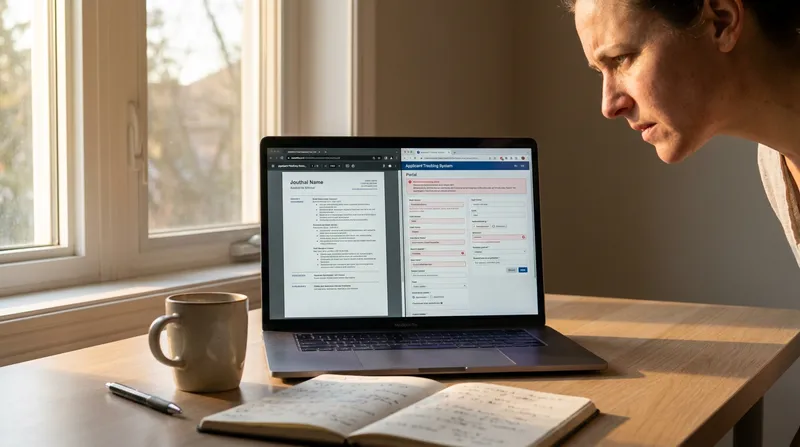
If you have ever groaned "Workday messed up my resume" after clicking "Autofill with Resume" on a myworkdayjobs.com portal, you know the exact frustration that follows. You upload a carefully formatted resume (or CV, if you are applying in the United Kingdom, Australia, or New Zealand) expecting a two-minute application. Instead, you watch Workday scramble your entire career history. Your phone number and email vanish, and your job titles swap places with your company names. Even worse, your skills sidebar merges into the middle of your achievement bullets, or a red banner halts your progress with an "Instance ID cannot be parsed" error.
Because every employer runs an isolated Workday database, you are forced to re-type your work history manually on every application. Worse, if you miss one corrupted field before hitting submit, you risk automatic rejection before a human ever sees your name.
Why did Workday mess up my resume? (And why it costs you interviews in 2026)
At JobSparrow, our team and advisors have reviewed 100,000+ resumes and bring 10+ years of hands-on recruiting and hiring experience across four markets (the United States, Australia/NZ, Singapore, and Hong Kong), alongside deep support for UK hiring standards. Because we have sat on both sides of the hiring table, we know the gap between what applicants think happens after they click submit and what recruiters actually see in the backend.
A popular piece of advice on job forums claims that when a Workday autofill with resume goes wrong, you do not need to worry because "the recruiter will just open your attached PDF anyway." In 2026, believing that myth will cost you interviews.
According to Workday's official HiredScore AI for Recruiting documentation, employers that license HiredScore AI for Recruiting on top of Workday Recruiting can have applicants graded automatically against the job requirements. Workday reports that HiredScore's candidate grading has cut recruiter screening time by 57% and hiring manager review time by 35%, and some organisations have matched upwards of 70% of requisitions to candidates already in their ATS.
If Workday's parser scrambles your fields and you do not fix the underlying document stream, the system grades or filters a broken profile.
What you can do right now:
- Never hit submit on a scrambled Workday autofill hoping the attached PDF will save you.
- Fix your master resume structure once so future Workday portals have the best chance of reading your history correctly.
- Start with a free diagnosis on JobSparrow to see your instant recruiter-lens score out of 100 and identify the gaps costing you interviews.
How the Workday resume parser actually reads your file in 2026
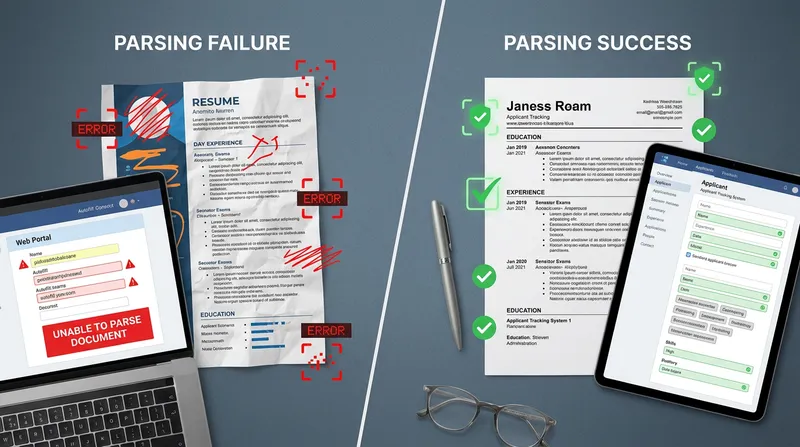
To understand why Workday scrambles your resume, you need to look at how its two-stage ingestion engine processes an uploaded document.
- Stage 1 (Linear Text-Stream Extraction): The moment you upload a file, Workday strips away all visual formatting, fonts, colors, and graphical borders. It converts your page into a flat, unformatted plain-text stream, reading strictly from left to right and top to bottom.
- Stage 2 (Natural Language Processing Entity Tagging): Workday passes that plain-text stream into a machine-learning tagging engine. The parser looks for structural boundaries (such as line breaks, standard headings, and date patterns) to classify chunks of text into database entities:
Job_Title,Company_Name,Start_Date,End_Date,Degree, andSkill.
This two-stage pipeline explains why graphic-heavy, two-column layouts from standard CV templates fail so catastrophically. The Harvard Business School and Accenture Hidden Workers report found that 99% of Fortune 500 companies use an ATS, and multi-column layouts, tables, text boxes, and headers routinely confuse parsing software.
When you use a two-column resume with a left-hand sidebar for "Skills & Education" and a right-hand column for "Work Experience," Workday's Stage 1 extractor often reads straight across the horizontal axis of the page. As we uncovered in our guide to the best free resume builders according to Reddit in 2026, many flashy template platforms advertise "ATS-friendly" designs that actually interleave your text horizontally.
Here is what happens to your text stream during Stage 1 ingestion:
- What a 2-Column Layout Looks Like to Workday's Parser (Broken):
SKILLS Senior Product Manager | Python, SQL, Jira Acme FinTech Corp, New York, NY | EDUCATION March 2022 - Present | B.S. Computer Science Led a cross-functional team of 12 engineers... - What a Single-Column Layout Looks Like to Workday's Parser (Clean):
WORK EXPERIENCE
Senior Product Manager
Acme FinTech Corp, New York, NY
March 2022 - Present
Led a cross-functional team of 12 engineers...
Actionable fix: Switch immediately to a single column resume template for Workday. Eliminate every sidebar, floating text box, and multi-column table so each line of your document represents one distinct data point.
4 common Workday autofill errors and how to fix them permanently
Like Greenhouse, which we cover in our recruiter guide on how to pass the Greenhouse ATS in 2026, Workday rewards clean formatting and strict adherence to Workday ATS formatting rules in 2026 to populate your online application fields cleanly. Here are the four most common autofill bugs and the exact Workday resume parser fix for each.
1. Workday parsing swaps job title and company name
One of the most frequent complaints from applicants is that Workday parsing swaps the job title and company name, putting "Senior Financial Analyst" into the Employer box and "Deloitte" into the Job Title box.
This swap happens for two reasons:
- Same-line punctuation: Putting your job title, company name, and location on the exact same line separated by vertical pipes (
|), hyphens (-), or commas confuses Workday's boundary detector. - Stacked promotions under one company header: When you have been promoted twice at the same employer and only list the company name once at the very top, Workday attaches the company name to your latest role and leaves your earlier titles without an employer.
Keeping organization names, job titles, and dates clearly separated in a single-column hierarchy without decorative punctuation prevents this error.
How to fix it permanently (The 3-Line Hierarchy Rule):
- Line 1: Job Title in bold (e.g., Senior Operations Manager)
- Line 2: Company Name, City, State/Country (e.g., Logistics Global Ltd, London, UK)
- Line 3: Start Month YYYY - End Month YYYY (e.g., April 2023 - Present)
- For promotions: Repeat the Company Name and Location on Line 2 for every single promoted role. Once your headers parse cleanly, focus on the substance underneath by using AI to turn job duties into measurable achievements.
2. How to stop Workday from deleting your contact info
If Workday leaves your Name, Email, and Phone Number completely blank on the first step of the application, your contact block is hiding in a blind spot.
To save vertical space on the page, many applicants double-click the top margin of Microsoft Word and type their contact details inside the Document Header zone, or place decorative telephone and envelope icons immediately next to their phone number and email address. Career centres such as UVA advise keeping your name, phone number, and email out of the document header and footer, because many parsers skip those zones.
Even if your contact block is in the main body, hidden XML drawing layers in Word templates can block extraction. You can see a full technical teardown of this issue in our guide on why your MS Word resume builder fails the ATS.
How to stop Workday from deleting contact info:
- Open your document and verify that your header and footer zones are 100% empty.
- Place your full name on the very first line of the main document body.
- Keep Line 1 exclusively for your first and last name, with zero punctuation or certification suffixes (such as "PMP" or "CPA") on that line.
- Delete all decorative contact icons and separate your phone number, email, city/region, and LinkedIn URL on Line 2 using simple spaces or plain text labels.
3. Missing employment dates and false career gaps
Have you ever uploaded your resume to Workday and noticed that three of your past roles suddenly have blank start dates, or that your end dates defaulted to today's date?
Applicants commonly report dropped dates when they use seasons ("Spring 2023"), two-digit years, or tables that push dates to the right margin.
Dropped dates are not a minor cosmetic glitch. Landmark research from the Harvard Business School Project on Managing the Future of Work revealed that over 90% of employers use their ATS to initially filter and rank candidates (94% for middle-skills roles and 92% for high-skills roles). The same report found that about half of employers automatically filter out candidates with an employment gap of more than six months, so a date the parser drops can make your history look patchier than it is.
How to fix your dates:
- Always write out the full month name (or standard 3-letter abbreviation) followed by the 4-digit year.
- Separate the start and end dates with a standard hyphen surrounded by spaces:
March 2022 - August 2025orMar 2022 - Present. - Never use a layout table to align dates to the right margin. Either place the date on its own dedicated line (Line 3 of your role header) or use a standard right-aligned tab stop.
4. Truncated bullet points and unparsed skills sections
If your achievement bullets turn into question marks (?) or hollow squares, or if Workday's "Skills" selector remains completely empty after upload, your typography and section titles are blocking the parser.
Workday relies on dictionary matching to identify where one section ends and the next begins. If you label your work history "Where I Have Made an Impact" or your skills section "My Toolkit & Superpowers," Workday treats the entire section as part of the preceding job description.
How to fix bullets and skills:
- Use standard section headings: Stick strictly to
Summary,Work Experience,Education,Certifications, andSkills. - Use standard circular bullets: Replace custom diamond arrows, checkmarks, or Wingdings characters with standard round bullets (
•). - Format skills as a comma-separated list: Remove graphical skill progress bars (such as "Python: 4/5 dots") and list your hard skills in clean plain text separated by commas.
Workday DOCX vs. PDF parsing: Which file format wins in 2026?
Job seekers constantly debate Workday DOCX vs PDF parsing. While Workday accepts both .docx and .pdf files, how you generate the file determines whether the autofill succeeds or fails.
Here is the technical truth in 2026:
- Why PDFs sometimes break on Workday: Workday parses text-based PDFs cleanly when they are exported directly from a word processor or a dedicated career platform. However, PDFs exported from graphic design platforms, where text boxes are placed visually on a canvas, can scramble reading order or turn text into outlines. When that happens, Workday sees an image instead of words.
- Why clean DOCX files excel at Autofill: A single-column
.docxfile stores text in a strict sequential XML tree (word/document.xml). Workday's Stage 1 extractor reads this tree with near-zero structural ambiguity.
Your 2026 File Upload Rule:
- Both
.docxand text-layer.pdfwork reliably when generated from a clean, single-column template. When you export your tailored resume from JobSparrow, you can download PDF or DOCX files with smart filenames (e.g.,Name_JobTitle_Resume.pdf). - Pro tip for repeat troubleshooting: If you ever have a stubborn PDF that refuses to autofill properly on an older employer portal, save a clean single-column
.docxversion exclusively to trigger the "Autofill with Resume" step, or replace the file attachment on the final review screen. - Avoid filename upload errors: Never include periods, ampersands (
&), hashes (#), or parentheses in your filename, as these characters can trigger a myworkdayjobs resume upload error.
Fixing myworkdayjobs.com portal bugs (US, UK, Australia & New Zealand)
Sometimes your resume formatting is spotless, yet the myworkdayjobs.com portal still throws a frustrating validation error. Because JobSparrow supports job seekers across the United States, the United Kingdom, Australia, and New Zealand, we track the exact portal bugs affecting local and migrant applicants across all four regions.
How to fix the "Instance ID cannot be parsed" error
Seeing the red banner Instance ID cannot be parsed or The uploaded file could not be scanned during step one of a Workday application can halt your progress immediately. Applicants commonly report that this error clears after one of the following steps:
- Open an Incognito or Private browser window with all third-party autofill extensions disabled.
- Re-export your resume as a fresh
.docxfile or a text-based.pdf. - Log back into the employer's Workday portal and click "Autofill with Resume" from a fresh session.
International phone numbers, country codes, and UK/AU/NZ CV length
If you are applying in the UK, Australia, or New Zealand, or if you are a migrant applying across borders, watch out for these regional Workday rules:
- The Country Code Phone Number Bug: When Workday parses an international phone number from your CV (such as
+44 7700 900077in the UK,+61 412 345 678in Australia, or+64 21 123 4567in New Zealand), it often dumps the+44,+61, or+64prefix directly into the local Phone Number text box. Because Workday already has a separate "Country Phone Code" dropdown field right above it, the portal throws a redEnter a valid format for Phone Numbererror. The fix: Delete the+country codeprefix from the number box on the Workday screen and type only your local digits. - Does a 2-to-3-page UK, Australian, or NZ CV break Workday? No. While a one-page resume is common in the United States, a two-page CV is standard in the UK, and two to three pages is common in Australia and New Zealand (especially for technical, government, or accounting professionals following our CPA Australia skills assessment resume and reference guide). Workday has zero penalty for multi-page documents. Just make sure you use an ATS friendly CV template for the UK and Australia where page breaks never split a job title on the bottom of Page 1 from its company name and dates at the top of Page 2.
How to test how Workday reads your resume in 60 seconds (Before you apply)
You do not need to wait until you are inside a live job application to find out how to test how Workday reads your resume. You can run a two-part pre-flight check in 60 seconds.
Step 1: The 15-second plain-text Notepad audit
Open your current resume PDF or Word document, press Ctrl+A (on Windows) or Cmd+A (on Mac) to select all text, copy it, and paste it into a blank Notepad or plain-text TextEdit window.
Scan the pasted text closely:
- Did your contact details at the top disappear?
- Did lines from a left-hand column merge into sentences from the right-hand column?
- Did your bullet points turn into weird symbols?
If the plain text in Notepad looks scrambled, Workday's parser is likely to struggle with it too.
Step 2: Diagnose both structure and recruiter impact with JobSparrow
Passing the plain-text parser is only the first hurdle. Once Workday extracts your fields cleanly, your profile still has to convince both any automated screening layer and the human hiring manager who reviews the shortlist.
That is why JobSparrow guides you along the complete five-stage Offer Path: Diagnose, Position, Execute, Prepare, and Close. Instead of acting like a basic keyword counter or a flashy graphic template tool, JobSparrow acts as your AI career advisor from your very first upload all the way to a signed offer:
- Diagnose (Free CV Diagnosis): Upload your current resume or CV for a free CV diagnosis. On the very same screen, you get your recruiter-lens score out of 100, a clear map of your Offer Path, and an honest breakdown of the specific gaps costing you interviews (such as vague impact, missing evidence, or seniority mismatch).
- Position & Execute (Clean Tailoring in Seconds): Store your complete history in your Master Career Profile and use our interactive Gap Filler to strengthen weak bullet points. When you are ready to apply for a role on Workday, JobSparrow tailors your resume and cover letter to the exact job description in under 60 seconds. You can download your tailored document as a PDF or DOCX in one of five templates (Professional, Two Column, Elegant, Colorful, and Contemporary). For Workday, choose a single-column layout.
- Prepare & Close (Winning the Interview and Offer): Once you reach the shortlist, some employers add an asynchronous chat or video screen. You can prepare with our guide on how to pass a Sapia.ai chat and video interview in 2026, practice role-specific scenarios using JobSparrow's AI mock interviews, and use our Offer & Negotiation Coaching to close the deal with confidence.
A traditional career consultant charges around US$300 for a single resume rewrite and around US$2,000 for a coaching program. With JobSparrow, you can start with a free diagnosis today with no demo and no waitlist. When you are ready to unlock unlimited tailored resumes, cover letters, and AI mock interviews, you can try the full Offer Path for 7 days for US$5.99, then US$45 a month (or £4.99 then £35/month in the UK, A$8.99 then A$59/month in Australia, and NZ$9.99 then NZ$59/month in New Zealand), cancel anytime in one click.
Frequently asked questions
If Workday messes up my autofill, do recruiters still read my attached PDF resume?
Usually not during the initial screen. The Harvard Business School Hidden Workers report found that more than 90% of employers use their recruiting software to initially filter or rank candidates, and those filters work on the structured fields created during parsing. If your autofill fields are scrambled or missing dates, the system can filter you out before a recruiter ever clicks on your attached PDF.
Should I use "Autofill with Resume" or "Apply Manually" on Workday?
Always use "Autofill with Resume" once you have formatted your document in a clean single-column layout. It populates your entire application in 10 seconds and acts as a live diagnostic test proving that Workday's backend parser can read your file accurately.
How do I list multiple promotions at the same company so Workday parses them correctly?
Do not stack multiple job titles under one single company heading. Instead, format each promoted role as its own separate entry using the 3-Line Hierarchy (Line 1: Job Title, Line 2: Company Name and Location, Line 3: Start Month YYYY - End Month YYYY). Repeating the company name under each title ensures Workday calculates your total tenure accurately.
Why does the Workday Skills field say "No Items" when I type my skills?
Workday's Skills box is a searchable database directory, not a free-text box. When you type a skill (such as "Project Management" or "Python"), you must press the Enter key on your keyboard to trigger the search dropdown, then click the matching skill tag to add it to your profile.
Why can't I use one Workday account to apply to different companies?
Every employer that uses Workday runs its own separate tenant (such as company.wd1.myworkdayjobs.com), so your candidate account and application data do not carry over between employers. Keeping a clean single-column resume that autofills accurately is the fastest way to apply across multiple companies.
Does a 2-page or 3-page CV break Workday's parser in the UK, Australia, or New Zealand?
No. Workday parses multi-page UK, Australian, and New Zealand CVs just as easily as 1-page US resumes. Simply use a single-column layout and check that page breaks do not split a role's 3-line header (Title, Company, Dates) across two separate pages.
Tags
Keep reading
Recommended articles.
ats resume · google docs resume
Google Docs vs. MS Word for Resumes: Why Built-In Templates Fail 2026 ATS Parsers (After 100k+ Reviews) | JobSparrow
Are Google Docs resume templates ATS friendly? After 100k+ reviews, see why Google Docs and MS Word templates fail 2026 ATS parsers and how to fix yours.
ats resume · resume formatting
ATS Friendly Resume Builder vs. Recruiter Reality: How to Pass Both Filters [Free CV Check]
Master the ATS vs human resume review. Pass ATS parsers, win the 7-second scan in the US, UK, AU & NZ, and get a free CV check.
cover letter alternatives · video cover letter
Free Cover Letter Alternatives in 2026 | JobSparrow
Skip the generic cover letter. Discover free modern alternatives, including video pitches, portfolios, and LinkedIn templates. Try JobSparrow free today.