
job search tracker
The Smart Job Search Tracker: Organize Applications & Predict Match Scores
By Job Sparrow Team
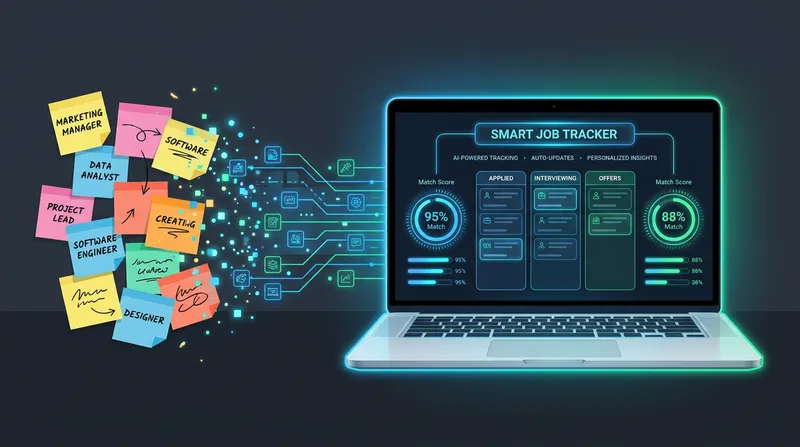
You have sent out 50 applications this month. Radio silence. You have 40 tabs open on SEEK and LinkedIn, and you are losing track of which customized CV went to which company. You spend hours applying for roles, only to panic when a job description is deleted right before an interview.
This administrative overload leads to serious application burnout. Managing a modern job hunt across multiple platforms is chaotic, and the sheer mental toll of tracking everything manually can derail your confidence. The problem is not your work ethic. The problem is your lack of a smart job search tracker to manage your application pipeline.
The hidden cost of a messy job application pipeline
Job hunting is a marathon. According to data from the U.S. Bureau of Labor Statistics, the average job search lasts approximately 24 weeks. When you are applying for jobs over several months, organization becomes a critical survival skill.
From a recruiter lens, hiring managers can instantly tell when an applicant is disorganized. At JobSparrow, our team has collectively reviewed over 100,000 resumes and hired across four global markets. We know firsthand that if you accidentally submit the wrong tailored CV, forget the details of the job description during a phone screen, or fail to follow up on time, you signal a lack of professionalism. Recruiters want candidates who are prepared and intentional.
If you are currently employed and trying to pivot, the chaos is even harder to manage. You need a system that allows you to execute a targeted search without dropping the ball at your current job. For a deeper dive on managing this delicate balance, read our guide on The Stealth Job Search: How to Discreetly Update Your CV While Employed.
At JobSparrow, we view a smart tracker as the critical "Execute" phase of your Offer Path. It is the bridge between diagnosing your CV gaps and preparing for your interviews.
Why you need a job search spreadsheet alternative in 2026
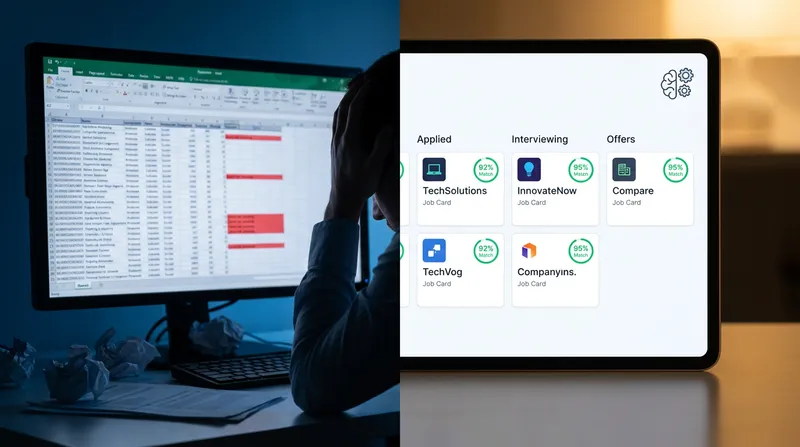
Many job seekers default to Microsoft Excel or Google Sheets to build a job search organizer. While a spreadsheet is better than nothing, it is no longer sufficient for an agile, modern job hunt.
Spreadsheets require massive amounts of manual data entry. You have to copy and paste job titles, company names, application dates, and URLs. Research from United Way NCA highlights that job seekers apply to an average of 62.6 jobs and spend roughly 44 minutes on each application. Conservatively, spending even 5-10 minutes per application on manual data entry adds up to 5-10 hours of administrative work across a typical search, time better spent on quality tailoring.
Furthermore, spreadsheets encourage the dangerous "spray and pray" method. When your only metric of success is adding another row to your Excel file, you focus on volume rather than quality. You end up submitting generic, low-quality applications just to feel productive.
An AI job search tracker acts as a strategic partner, not just a digital filing cabinet. It automates the administrative busywork so you can focus on what actually gets you hired: high-quality, targeted applications. To see how automation can speed up your workflow, check out How to Use an AI Resume and Cover Letter Creator to Apply in Under 5 Minutes.
What makes an AI job search tracker truly smart?
Not all tracking tools are created equal. A basic job tracker app simply replaces your spreadsheet with a prettier interface. A truly smart automated job tracker actively helps you land the job by providing predictive insights and safeguarding your data.
Here are the three critical features you must look for in a modern job application management platform.
Automated URL fetching: Never lose a job description again
It is a common and terrifying scenario. You finally get an email inviting you to an interview. You click the original SEEK or LinkedIn link to review the requirements, only to find a page that says "This job is no longer accepting applications." You are left completely blind, trying to remember what the employer actually wanted.
Job boards routinely delete postings once they have enough candidates. A smart job tracker solves this by automatically fetching and saving the full text of the job description the moment you log the URL.
Having the original text saved permanently is crucial for your interview preparation. It allows you to review the exact phrasing the employer used, which is also vital for later stages in the Offer Path. For example, knowing the exact responsibilities listed in the original posting gives you immense leverage when it is time to discuss compensation. You can learn more about this strategy in How to Negotiate a Salary Offer in Australia (Without Losing the Job) + Scripts.
Centralized document storage: Knowing which CV went where
To beat the Applicant Tracking System (ATS), you must tailor your CV for every single application. However, this creates a new problem: file management chaos. Having 40 different PDF files on your desktop named "Resume-Final-v3.pdf" is a recipe for disaster.
If a recruiter calls you out of the blue to discuss your application, you need to know exactly which version of your experience they are looking at. A smart organizer links your specific, tailored CV and cover letter directly to the tracked job opportunity in one centralized dashboard.
From a recruiter's perspective, when a candidate references a skill or project that does not appear on the CV we are looking at, it immediately raises a red flag. It signals either dishonesty or disorganization. Our team has seen this happen across thousands of screens. A centralized tracker ensures you never accidentally reference a skill you left off that specific resume. It also helps you avoid the trap of using generic templates that fail regional algorithms. For more on regional ATS nuances, read Generic AI Cover Letter Tools vs. JobSparrow: Why One-Size-Fits-All Fails AU/NZ ATS.
Pre-application match scores: Stop wasting time on dead ends
Perhaps the most powerful feature of a modern AI job search tracker is predictive analytics. JobSparrow includes a built-in job match calculator that scores your profile before you even start writing your application.
According to SelectSoftware Reviews, nearly 99% of all Fortune 500 companies use ATS platforms to filter candidates. Australian and New Zealand enterprises follow the same pattern, as major employers across both markets rely on ATS platforms to manage application volume, making keyword alignment equally critical for local job seekers. If your core experience does not align with the job description, the ATS will reject you instantly.
Our Match Score feature compares your Master Profile against the fetched job description. Your Master Profile is JobSparrow's centralized record of your full career history, including every role, skill, and achievement, which the AI draws from to build every tailored application. The system analyzes your skill overlap and keyword alignment, giving you a clear percentage score.
If the score is too low, the AI will show you exactly what skills are missing through a detailed Gap Analysis. JobSparrow's Gap Filler then walks you through a targeted Q&A to address those gaps, asking the right questions to surface achievements you may have overlooked, and weaving your answers back into your Master Profile automatically.
This is incredibly valuable for migrants and career changers. If you have a non-traditional background, you need to know if your transferable skills are translating to the local market requirements. By filtering out low-probability roles, you prevent application burnout and focus only on jobs you can actually win. Once you find a high-match role, you can move forward confidently. Learn the next steps in How to Tailor Your Resume to Any Job Description (& Beat the ATS in 60 Seconds).
Want to see your Match Score before your next application? Start with a free diagnosis at JobSparrow. It takes minutes and shows you exactly where you stand.
How to organize your job search tracker (Step-by-step guide)
A recent survey by Aerotek revealed that 34% of job seekers report their job hunt lasting at least six months. To survive a search of that length, you need a repeatable, efficient workflow. Here is how to use an automated job tracker effectively.
Step 1: Log the opportunity immediately. The moment you find an interesting role on SEEK, LinkedIn, or Indeed, drop the URL into your tracker. If you are still manually scrolling multiple job boards, JobSparrow also aggregates listings into a single ranked dashboard, so you can find, log, and score opportunities without switching tabs. Do not wait until you are ready to apply. Fetching the data immediately ensures you capture the job description before it expires.
Step 2: Check your Match Score. Review the AI-generated Match Score and Gap Analysis. If you are missing critical, non-negotiable requirements, move on. Do not waste 45 minutes tailoring a CV for a job that an ATS will automatically reject.
Step 3: Generate and attach tailored documents. Use your AI tools to align your Master Profile with the saved job description. Generate your highly targeted resume and cover letter, and ensure the final PDF files are attached directly to the job card in your tracker.
Step 4: Track follow-ups and interview stages. Move the job card through your pipeline stages (Applied, Interviewing, Offered, Rejected). Keep detailed notes on all correspondence. If you haven't heard back in a week, use your tracker's timeline to prompt a follow-up. Need help finding the right words? Use our templates in How to Follow Up on a Job Application by Email (Without Being Annoying) + 5 Templates.
Common job tracking mistakes to avoid
Before you optimize your pipeline, ensure you are not falling into these common traps:
- Logging applications only after submission: If you wait until you hit apply, the job description may already be deleted. Log the URL the moment you find the role.
- Using generic file names: Saving documents as "Resume-Final-v3.pdf" makes it impossible to know which version went where without opening every file.
- Failing to note the specific CV version sent: If a recruiter calls, you must know exactly which skills they are looking at on your tailored resume.
- Skipping the Match Score check: Investing 45 minutes into tailoring a resume for a job you have no chance of winning is a fast track to burnout. Always check your score first.
Moving beyond the tracker: The full Offer Path
Tracking your applications is a vital part of the job hunt, but it is only one piece of the puzzle. At JobSparrow, tracking falls into the "Execute" phase of our five-stage Offer Path: Diagnose, Position, Execute, Prepare, and Close.
Once your tracker is organized and you start landing interviews, you must pivot to the "Prepare" phase. Your saved job descriptions will become the foundation for your practice sessions. You can learn exactly how to leverage this data in The Engineer's Guide to AI Mock Interviews: Mastering Technical, Behavioural & Competency Scenarios.
Ready to ditch the messy spreadsheets and land more interviews? Start with a free diagnosis. See your recruiter-lens score and identify the exact gaps costing you interviews in minutes. Start your free diagnosis with JobSparrow today and unlock the full Offer Path for a one-time $129 flat fee (no subscription, no auto-renewal).
Frequently asked questions
What is the best way to track job applications?
The best method moves away from manual spreadsheets and uses an AI-powered tracker. A smart system automatically fetches job descriptions, stores tailored documents, and tracks interview stages in one centralized dashboard, saving you hours of administrative work.
Why should I use a job search spreadsheet alternative?
Spreadsheets require too much manual data entry and cannot save full job descriptions before they are deleted from job boards. They also lack predictive analytics, meaning you have no way of knowing if an application is worth your time before you start typing.
How does a job match calculator work?
An AI job match calculator analyzes your master career profile against a specific job description. It scores your keyword alignment and skill overlap to predict your chances of passing an Applicant Tracking System (ATS), highlighting exact skill gaps you need to address.
What should I do if a job description is deleted before my interview?
Using an automated tracker prevents this entirely by fetching and saving the text permanently the moment you log the URL. If you did not use a tracker, you can try checking search engine caches or politely asking the recruiter to provide a copy of the original posting.
How does an ATS job tracker help me get hired?
An ATS tracker helps you organize the highly tailored resumes required to beat employer algorithms. By linking specific documents to specific roles, it ensures you never send a generic, low-performing CV by mistake.
Tags
Keep reading
Recommended articles.
ai job search · python automation
Build Your Own AI Job Search Agent: Automate Your AU/NZ Job Hunt with Python, Claude, and the JobSparrow API
Build your own AI job search agent using Python, Claude, and the JobSparrow API. Automate your AU/NZ applications and land interviews faster.
resume tailoring · ai job search
Beat the Bots: How AI Tailoring Transforms Your Resume for Every Application
Beat ATS bots and land more interviews with AI-powered resume tailoring. Try JobSparrow's resume builder risk-free and get noticed by recruiters.
personal ats · job application tracker
Beyond Spreadsheets: How to Build a Personal ATS (Job Application Tracker)
Ditch your job search spreadsheet. Build a personal ATS to track applications, manage tailored resume versions, and land more interviews with less burnout.